
On this page
- Key takeaways
- How common is AI automation for small business?
- Which workflow should you automate first?
- Which 10 AI workflow automation ideas are worth building?
- What does AI automation for small business cost?
- How do you keep an automation from sending wrong information?
- What does the evidence not tell you?
- Where to get help building these workflows
- Frequently asked questions
AI automation for small business means connecting the tools you already use so software handles repeatable steps, such as logging a lead, drafting a follow-up or sorting support email, while a person reviews anything risky. Start with one high-volume, low-risk task, measure the hours it saves, and add more only after it runs cleanly. This article covers ten workflows, costs, risks and the limits of the data.
If you would rather have someone scope and build these for you, Atgler’s AI tools and automation service covers that. The rest of this article is meant to help you decide what is worth building either way.
Key takeaways
- The U.S. Census Bureau measured 19.8% of U.S. businesses using AI as of May 3, 2026, far below the 66% and 76% reported by owner surveys.
- Start with lead capture and acknowledgment: it is frequent, rule-based and cheap when something goes wrong.
- Zapier’s Free plan includes 100 tasks a month; Pro starts at $19.99 a month on annual billing for 750 tasks.
- Draft, don’t send: keep a human approval step on customer replies and invoices.
- Reported time and money savings are self-reported expectations, not measured results.
How common is AI automation for small business?
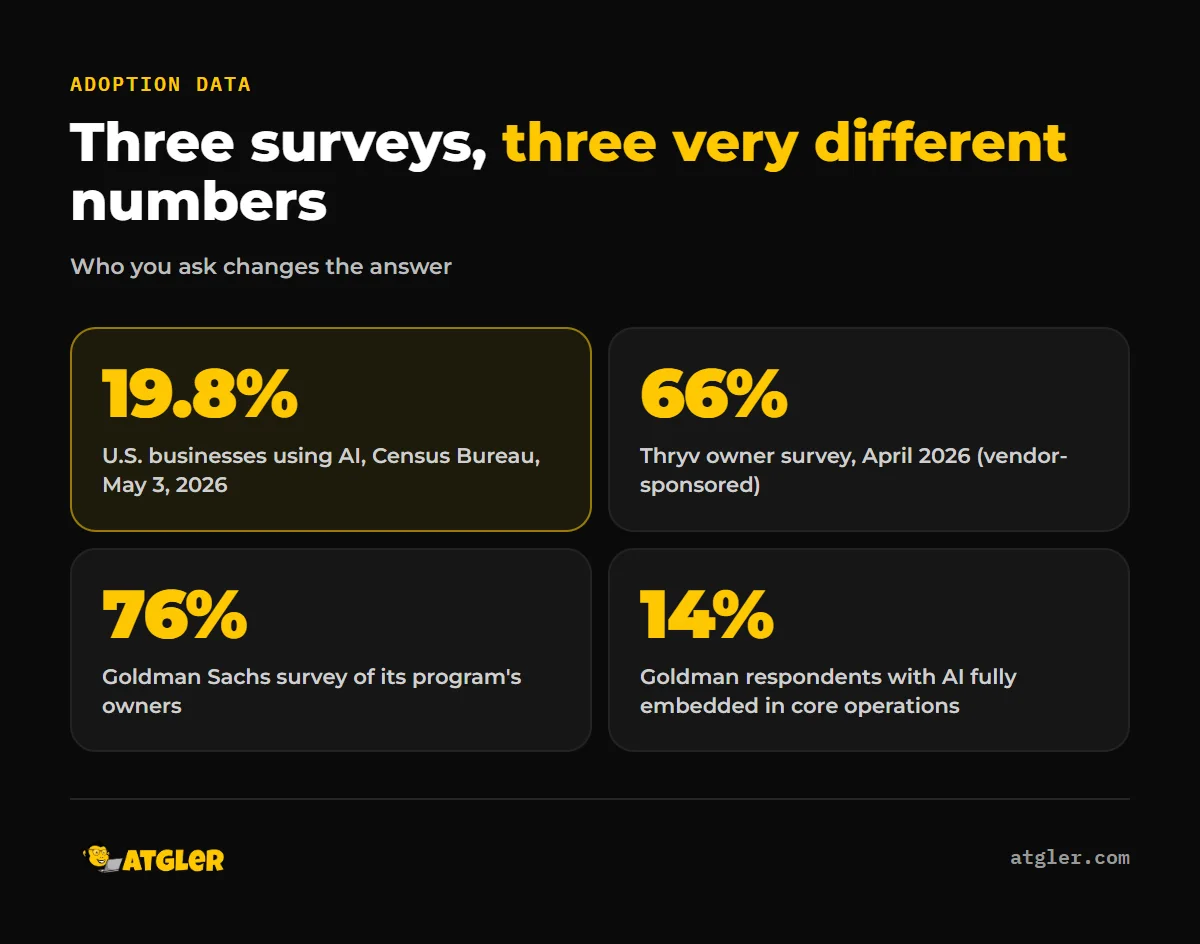
Less common than most headlines suggest, if you use the government baseline. The U.S. Census Bureau’s Business Trends and Outlook Survey (BTOS) found 19.8% of U.S. businesses used AI as of May 3, 2026, and the share stayed between 17% and 20% from December 2025 to May 2026. Fewer than 20% of firms with four or fewer employees reported using it, compared with 37% of firms with 250 or more employees and 32% of firms with 100 to 249. Retail Trade was about 14%.
Owner surveys report much higher numbers. Thryv’s survey of 561 U.S. small and mid-sized business owners, conducted in April 2026, reported 66% adoption, up from 55% a year earlier. Thryv sells marketing software to local service businesses, so this is vendor-sponsored research. Goldman Sachs’ 10,000 Small Businesses Voices survey, as reported by CPA Practice Advisor in March 2026, reported 76%, but the coverage does not state a sample size or field dates.
Wording matters too. Census asks about AI use in the past two weeks and, since November 2025, in “any business function”; it warns that readings before and after that change are not directly comparable. Depth is also thin among adopters: only 14% of Goldman respondents said AI is fully embedded in core operations, and 70% of Thryv respondents and 73% of Goldman respondents said they need more training. Because sampling and wording differ, treat the Census figure as the conservative baseline.
Which workflow should you automate first?
Automate the task that happens often, follows clear rules and costs little if it goes wrong, which for most small businesses means lead capture and acknowledgment. No source in this article ranks workflows by payoff, so this is a judgment call, not a statistic.
Use four tests before you build anything:
- Frequency: it happens at least weekly, so the time saved adds up.
- Clear rules: you can write down the steps without “it depends.”
- Low blast radius: a mistake is an annoyance, not a refund or a lost client.
- Measurable: you can count the minutes it takes today.
Tasks that fail the third test, such as sending invoices or answering complaints, can still be automated. They just need a human approval step.
Which 10 AI workflow automation ideas are worth building?
These ten are listed roughly from safest to most sensitive, so you can build down the list as your confidence grows. Each one fits the category of small business automation that removes repetitive handoffs.
- Lead capture to one place. A website form submission lands in your CRM or a shared sheet and pings you, instead of sitting in an inbox.
- Instant acknowledgment. The lead gets a short, fixed confirmation with your next step and response time.
- Follow-up tasks. A new lead creates a task with a due date, and an unanswered quote creates a reminder.
- Appointment confirmations and reminders. Booked jobs trigger a confirmation and a reminder message from a template.
- Support email triage. Google’s developer documentation gives this exact example for Workspace Studio: receive a customer email, prompt Gemini to triage it, then create a follow-up task for the sales or support team.
- Weekly reporting digest. Leads, jobs and invoices are pulled into one summary that arrives on Monday morning.
- Invoice drafting. A won deal or completed job creates a draft invoice for you to review and send.
- Payment reminders. Overdue invoices generate a polite reminder, queued for approval rather than sent blindly.
- Review requests. A completed job triggers a request for a review a day or two later.
- Call and meeting notes to tasks. Notes are summarized and action items become tasks with owners.
Workflows 1 to 4 and 6 mostly move data and send fixed text. Workflows 5, 7 and 8 involve judgment or money, so keep a review step on them.
What does AI automation for small business cost?
The software is often the smaller cost; the larger one is the time to design, test and monitor each workflow. On the software side, Zapier publishes a clear task-based model. Each successful action step uses 1 task per run. Triggers, Filter and Paths steps, failed or halted action steps and editor test runs do not use tasks.
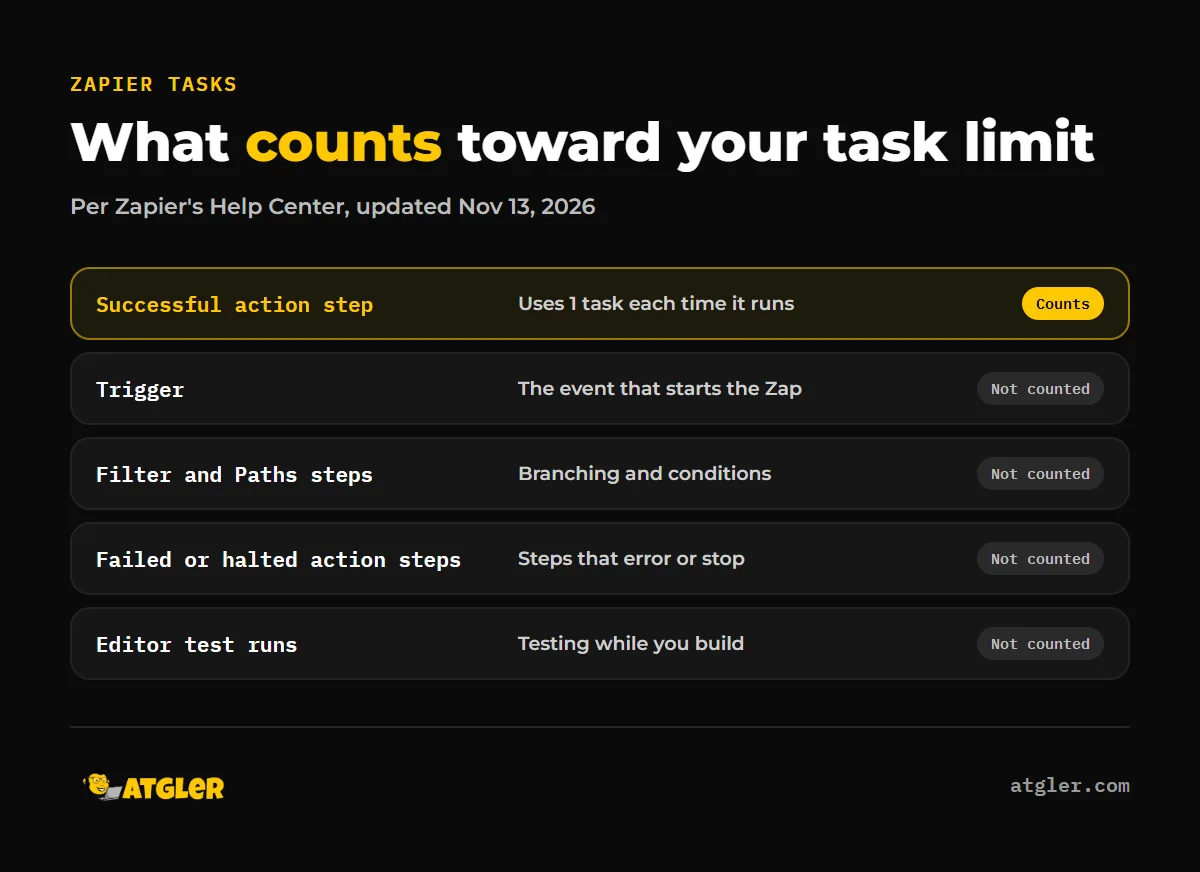
That makes costs predictable. As an illustration, a lead workflow with three action steps (add a row, send a notification, create a task) uses 3 tasks per lead, so 100 leads a month uses 300 tasks. Zapier’s pricing page lists the Free plan at $0 for 100 tasks a month. Pro starts at $19.99 a month on annual billing for 750 tasks, with larger tiers at $39 (1,500 tasks), $49 (2,000) and $89 (5,000). Monthly billing for 750 tasks is $29.99. Team starts at 2,000 tasks for $69 on annual billing.
Know the overage rules before you rely on it. With pay-per-task enabled, overage is billed at 2.5x the base rate on monthly plans and 1.25x on annual plans, and usage stops at 3x your subscribed tasks. Some products bill differently: Lead Router uses 5 tasks per successful lead. Zapier also says Next Gen Zaps, starting December 1, 2026, use no tasks for filters, formatting, loops or branching. Zapier tells readers to confirm prices on its live pricing page, and so should you.
For context on spending, Thryv’s survey found 53% of AI users spend at least $100 per month on AI tools. That figure is vendor-reported and covers AI tools generally, not automation platforms specifically.
Do you need to code, and should you pick Zapier or Google Workspace Studio?
Not necessarily. Google describes Workspace Studio as a way to build flows without code, with AI steps optional. If you already run Google Workspace, it is worth trying first for email triage and task creation. If your workflow spans many outside apps, compare it with Zapier.
| Question | Zapier | Google Workspace Studio |
|---|---|---|
| Pricing | Published tiers, from $0 for 100 tasks a month | No separate pricing confirmed in the sources used here |
| AI steps | Zapier Agents use a separate quota | Your admin must enable Gemini for work accounts |
| Availability | Any account | Business Starter, Standard and Plus; Enterprise Standard and Plus |
| Connections | Many apps, task-based billing | Asana, Jira, Mailchimp, Salesforce, plus webhooks to external APIs |
Google’s March 19, 2026 update says Studio has launched to all Rapid Release and Scheduled Release domains. Its help page links to a separate limits article, so check usage limits before you depend on it.
How do you keep an automation from sending wrong information?
Make the automation draft and a person approve whenever the message or number affects a customer or your books. This is practical advice, not a finding from the sources here. This article does not cite error rates for AI replies or invoicing, because no primary source for them is included.
- Draft, don’t send. Route AI-written replies and invoices to a review queue first.
- Use fixed templates where you can. Acknowledgments and reminders rarely need generated text.
- Limit the data you pass in. Send only the fields a step needs. Data privacy was one of the barriers Goldman respondents named, along with lack of technical expertise and difficulty choosing tools.
- Read the vendor’s data terms before connecting customer or financial records.
- Add a failure alert. Zapier does not count failed steps as tasks, but a failed step still means a lead went unprocessed.
Silent failure is the risk we see most often in site maintenance. At Atgler, a backup plugin that silently disconnected stopped both backups and downtime alerts, and the site was found hacked later. The same pattern applies to automations: a form plugin update or a revoked connection can quietly break a workflow. Our website care plans include a check that the site works after each update, which is where form-to-automation handoffs tend to break.
What does the evidence not tell you?
It does not tell you how much a specific workflow will save you. Thryv reports that 79% of respondents expect to recover 11 to 60 hours per month, 61% estimate $500 to $2,000 in monthly savings, 70% say AI increased revenue and 55% say it reduced costs. Those are self-reported, vendor-sponsored figures with no breakdown by use case such as support, marketing or finance.
Other gaps:
- Goldman reports 92% of Thryv’s AI users say it saves them time, and 93% of Goldman’s AI users report a positive impact, but neither measures results for lead capture, invoicing or triage individually.
- Census says its supplemental survey covers 15 business functions, including finance, customer service and marketing, but the page cited here gives no per-function numbers.
- Costs beyond Zapier, such as Gemini add-ons or per-run AI model fees, are not confirmed.
- Census figures after May 2026 were not available to check.
The honest reading: adoption is growing, most owners say it helps, and the hard numbers on payoff per workflow do not exist yet. Measure your own before and after.
Where to get help building these workflows
If you want a second pair of hands, Atgler’s AI automation services can help you pick the first workflow, connect it to your WordPress site and keep it monitored. Atgler has worked with WordPress for 7 years and has built, managed and maintained more than 600 sites, so the website side of lead capture is familiar ground. You can also see how this fits with our solutions for small business or contact us with a description of the task you want to remove.
Frequently asked questions
How many hours can AI automation realistically save a small team?
No independent measurement exists in the sources used here. In Thryv’s vendor-sponsored survey, 79% of respondents expect to recover 11 to 60 hours per month, but that is a self-reported expectation.
What happens if I go over my Zapier task limit?
With pay-per-task enabled, overage is billed at 2.5x the base rate on monthly plans and 1.25x on annual plans. Usage stops at 3x your subscribed tasks.
Do I need coding skills?
Google says Workspace Studio flows can be built without code, with AI steps optional. Check that your Workspace edition is eligible and that your admin has enabled Gemini.
Which workflow should I build first?
Start with lead capture and an instant acknowledgment. They are frequent, rule-based and low risk, which makes them easy to test and measure.
Is it safe to put customer data into automation tools?
Data privacy is a concern small businesses raise: Goldman respondents named it as a barrier. Send only the fields each step needs and read the vendor’s data terms before connecting customer or financial records.
Sources
- U.S. Census Bureau: Large Firms With at Least 20 Employees Biggest AI Users (May 26, 2026; official)
- CPA Practice Advisor: AI Adoption Continues to Rise, But 70% Say They Need More Training (July 14, 2026; reports the Thryv survey, vendor-reported)
- Carrier Management: Coverage of the Thryv small business AI survey (July 15, 2026; vendor-reported)
- CPA Practice Advisor: Small Businesses Adopt AI but Need Training and Support to Fully Use It (March 17, 2026; reports the Goldman Sachs survey)
- Zapier: How is task usage measured in Zapier? (updated November 13, 2026; vendor-reported)
- Zapier: Plans, Prices, and Overage Rules (undated, retrieved November 18, 2026; vendor-reported)
- Google for Developers: Extend Google Workspace Studio (undated)
- Google Workspace Studio Help: Access to Workspace Studio (undated)
- Google Workspace Updates: Workspace Studio (December 3, 2025, updated March 19, 2026)