
On this page
- Key takeaways
- What are the three types of WordPress malware scanner?
- How do the main WordPress malware scanner plugins compare?
- What can a remote WordPress malware scan not see?
- Can you check WordPress for malware with checksums alone?
- Is a free WordPress malware plugin enough?
- What is the best WordPress malware scanner setup for a small site?
- What can no WordPress malware scanner verify?
- Should you trust a scanner plugin that looks abandoned or closed?
- When should you get help with a WordPress malware scan?
- Frequently asked questions
The best WordPress malware scanner depends on what you need it to see. File scanners that run on your server, such as Wordfence, read your files. Remote scanners such as Sucuri SiteCheck only see what a visitor’s browser sees. Checksum tools compare core files to clean copies. None of them can prove a site is clean, so the sensible approach is to layer more than one.
This comparison is compiled from official WordPress.org directory listings, vendor documentation and WordPress.org’s own hacked-site guide, and is current as of November 2026. If a scan has already turned something up and you want it handled, our hacked site repair service covers cleanup end to end.
Key takeaways
- A WordPress malware scan comes in three kinds: file scanners on your server, remote scanners that act like a visitor, and checksum tools that compare core files to clean copies.
- Sucuri’s own SiteCheck page says a remote scanner “will not detect anything on the server-side.”
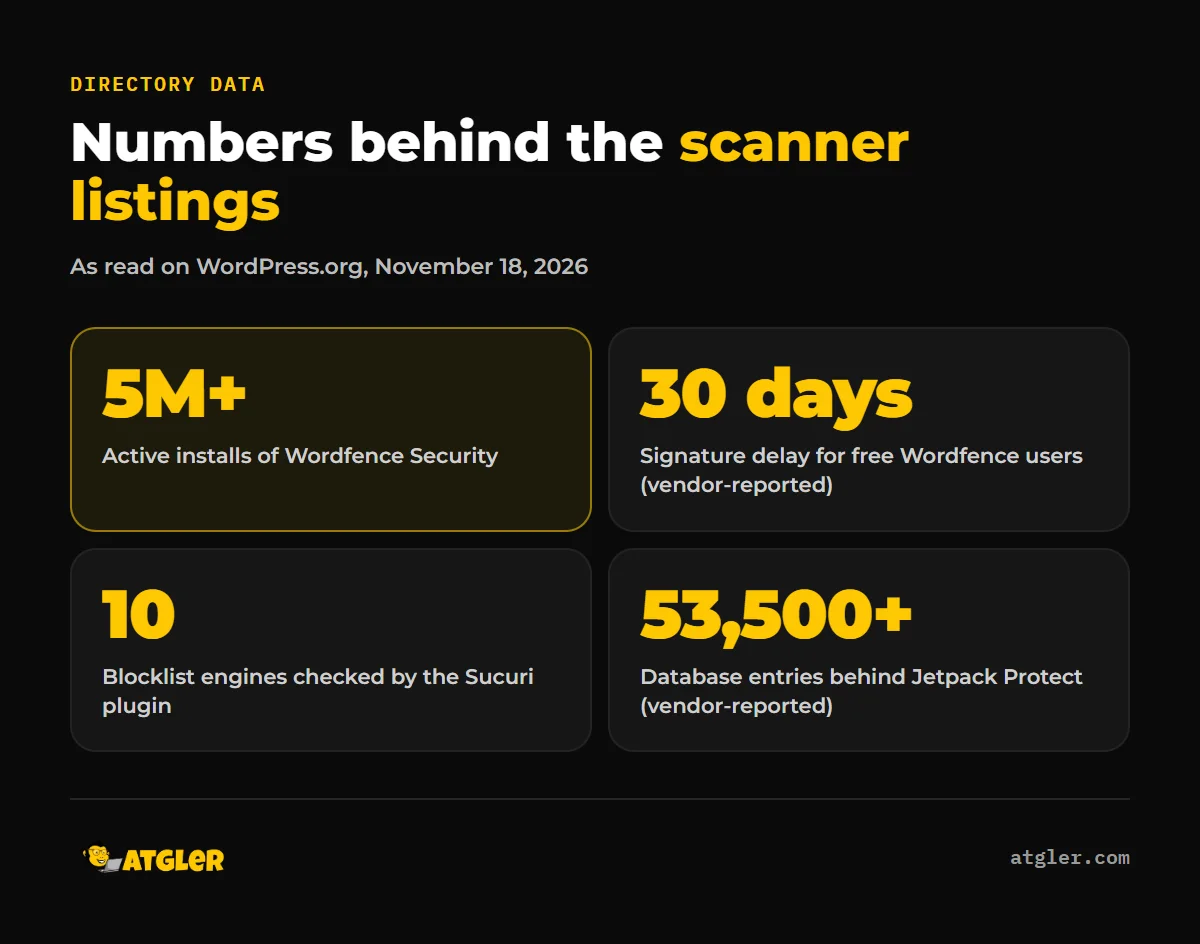
- Free tiers differ a lot: Wordfence free delays signatures by 30 days, and Jetpack Protect’s free tier covers vulnerabilities only (both vendor-reported).
- No independent, method-stated study comparing detection rates across these scanners was available to cite, so no ranking by “catches the most” is possible.
- No scanner can verify that a site is clean or tell you how the attacker got in.
What are the three types of WordPress malware scanner?
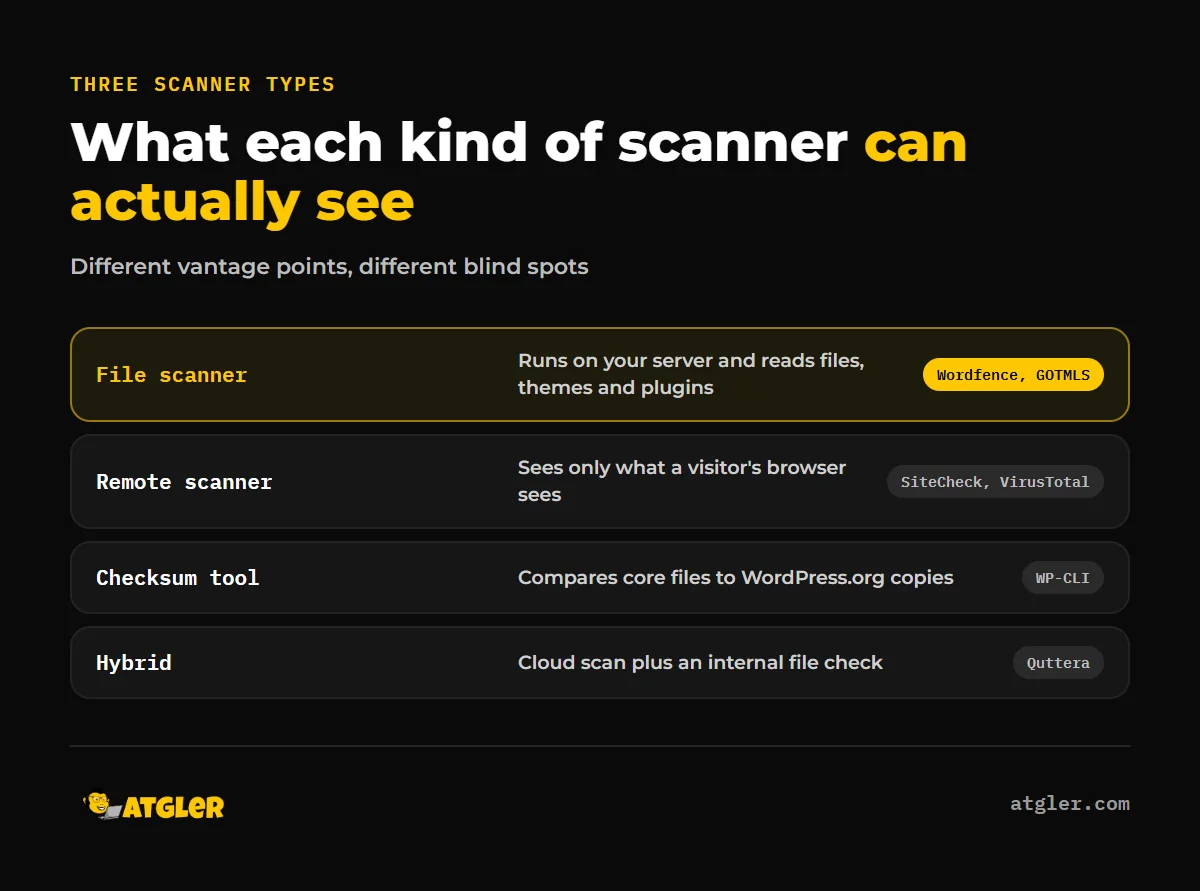
The three types are file scanners, remote scanners and checksum tools. They differ in where they run and what they can read.
File scanners are plugins that run on your own server. Wordfence’s directory listing says it compares core files, themes and plugins against the versions in the WordPress.org repository and checks for backdoors, SEO spam and malicious redirects. It also describes heuristics alongside its signatures.
Remote scanners look at your site from outside. Sucuri’s listing says its SiteCheck-powered scan “accesses the site like a regular visitor.” That is useful for spotting injected scripts and blocklist status, but it is a view from the front door only.
Checksum tools compare files with known-good copies. WP-CLI’s wp core verify-checksums downloads MD5 checksums for your WordPress version from WordPress.org and compares them with the installed files. According to the WP-CLI handbook, it does not load WordPress while doing so, “for security reasons.” Atgler’s own scanning works on the same principle: we compare file checksums against clean WordPress files, which gives accurate, current results.
| Type | Example | What it can see | Known limit |
|---|---|---|---|
| File scanner | Wordfence, GOTMLS | Files on the server, including backdoors and spam code | Depends on its signatures and heuristics; free tiers can be delayed or limited |
| Remote scanner | Sucuri SiteCheck, VirusTotal | Page output and blocklist status | Per Sucuri, cannot detect anything server-side; results “not guaranteed” |
| Checksum tool | WP-CLI | Core files that differ from WordPress.org copies | The docs page does not state whether plugin and theme folders are covered |
WordPress.org’s hacked-site FAQ (updated July 26, 2026) lists plugin scanners such as Quttera, GOTMLS, Wordfence and Sucuri separately from remote crawlers such as VirusTotal and Sucuri SiteCheck. It also says no single solution is the best approach, but using several improves your odds greatly. Treat the categories as layers, because each one sees something the others cannot.
How do the main WordPress malware scanner plugins compare?
They differ most in what the free tier does. Every figure below comes from each plugin’s WordPress.org listing, read November 18, 2026, and most of the feature text is written by the vendors themselves.
| Plugin | Directory data | How it scans | Free-tier limits (vendor-reported) |
|---|---|---|---|
| Wordfence Security | 5+ million installs; 4.7/5 from 5,052 reviews; version 9.1.1, Nov 10, 2026 | File scan on your server | Signatures delayed 30 days; blocklist check is Premium-only |
| Sucuri Security | 600,000+ installs; 4.2/5 from 386 ratings; version 2.8.1, Oct 14, 2026 | File integrity baseline plus remote SiteCheck scan; checks ten blocklist engines | Vulnerability scanners need a Sucuri Firewall (WAF) API key |
| Jetpack Protect | 100,000+ installs; 4.6/5 from 123 reviews; updated Nov 16, 2026 | Daily check of core, plugins and themes against a 53,500+ entry database powered by WPScan | Free covers vulnerabilities only; malware scanning and one-click fixes are paid |
| MalCare Security | 100,000+ installs; 4.4/5 from 561 reviews; modified Nov 11, 2026 | Cloud scan on MalCare’s servers | Free includes deep file and database scanning; cleanup is paid |
| Anti-Malware Security (GOTMLS) | 100,000+ installs; 4.9/5 from 784 reviews; modified Oct 27, 2026 | File scan on your server | Unregistered sites get “Potential Threats” flagged only; core integrity checks are premium |
| Quttera Web Malware Scanner | 10,000+ installs; 3.9/5; modified Nov 15, 2026 | Cloud scan (40+ security authorities) plus internal core integrity scan | No automatic removal or scheduled scans |
A few details matter in practice. Quttera’s internal scan relies on WP-Cron, and its FAQ warns that if WP-Cron does not work, the scan may report 0 scanned files. On hosts with a single PHP worker, the admin screen can freeze during a scan. GOTMLS says it does not auto-remove Potential Threats because code using eval and similar functions may be legitimate, and removal could break the site. That is an honest limit, but it means you must judge each flag yourself.
Jetpack Protect’s own FAQ says it is “not designed to fully clean a site that was already infected.” MalCare’s listing claims cleanup in “less than 60 Secs,” while its own FAQ says cleanup “usually takes 5-10 mins.” Treat the speed claims on any listing with caution. Ratings measure user satisfaction, not how much malware a scanner detects.
What can a remote WordPress malware scan not see?
A remote WordPress malware scan cannot see files on your server. Sucuri says so on its own SiteCheck page: because the scanner “only has access to what’s visible on the browser level,” it “will not detect anything on the server-side.”
The same page says detecting backdoors and phishing pages requires the paid Sucuri Platform, which can “scan every file in a website’s directory.” It also carries the disclaimer: “Remote scanners have limited access and results are not guaranteed.” Because that admission sits next to a paid product, it is worth reading with a sales motive in mind. It is still a vendor describing the limits of its own free tool.
The practical lesson: a green result from a remote scan tells you what a visitor’s browser sees at that moment. It says nothing about a backdoor sitting in a plugin folder. For visible symptoms like redirects, see our guide on finding what is sending visitors away.
Can you check WordPress for malware with checksums alone?
You can check WordPress core with checksums, but that is only part of the job. wp core verify-checksums compares your installed core files with the official ones for your version, which is a fast, objective test.
If it fails unexpectedly, the WP-CLI docs say to pass the --version and --locale values shown on the Dashboard Updates screen. The --insecure option retries without certificate validation, and the docs flag it as “vulnerable to a MITM attack,” so avoid it unless you understand the risk.
The handbook page does not say whether plugin and theme directories are verified, so we make no claim either way. Premium plugin and theme files have no WordPress.org checksum to compare against. Those must come from the original developer when you replace them.
Is a free WordPress malware plugin enough?
A free tool is a reasonable first check, but read what the free tier actually does. According to the vendors’ listings, Wordfence free gets signatures 30 days after Premium users do, Jetpack Protect’s free tier does not scan for malware at all, and GOTMLS free flags Potential Threats without removing them.
There is a second gap: the figures that circulate about how much malware free tiers miss come from competitors’ blogs. No independent comparison with a stated method has been published that we can point to, so we cannot tell you which scanner catches more. Any article that ranks them by detection rate is repeating vendor claims or guessing.
Which one is the best WordPress malware plugin for you therefore comes down to fit: where it runs, what the free tier includes, and whether you will keep it running. We have seen a backup plugin silently disconnect, which stopped both backups and downtime alerts, and the site was found hacked later. A scanner that has quietly stopped is worse than none because it looks like protection. If you are weighing plugins more broadly, our comparison of security plugins goes further, and so does our look at whether scanner plugins catch everything.
What is the best WordPress malware scanner setup for a small site?
The best WordPress malware scanner setup is a combination, in line with WordPress.org’s advice that several tools together improve your odds. A reasonable layering looks like this:
- Run one file scanner on the server and keep it scheduled and working.
- Add a remote check, such as SiteCheck or VirusTotal, for what visitors and blocklists see.
- Verify core files against WordPress.org checksums.
- Keep plugins, themes and core updated so known vulnerabilities are closed.
- Confirm now and then that the scanner is still running and reporting.
WordPress.org also advises scanning your local computer, because “some viruses are good at detecting AV software and hiding from them.” A site can be reinfected from a compromised device holding your logins.
What can no WordPress malware scanner verify?
No scanner can verify three things: that your site is clean, that no backdoor remains, and how the attacker got in. We found no neutral source that says a clean scan proves a site is clean, and several sources point the other way.
- A clean result is not proof. In a 2017 WordPress.org forum thread (anecdotal and old), a user running Wordfence and Sucuri SiteCheck kept seeing files modified. Another poster reported clean scans while code kept appearing in a wp-includes file. The original poster later found malicious code in a plugin. The thread is closed and marked not resolved.
- Cleanup is not guaranteed by the scanner. Wordfence’s FAQ says site security “cannot be assured” after a hack unless you do a full reinstall, yet the same listing also promotes cleaning tools and paid services. WordPress.org’s FAQ takes a more selective view: /wp-admin and /wp-includes can safely be replaced, while wp-content, .htaccess, index.php, header.php, footer.php and function.php need closer review.
- The entry point is hard to prove. WordPress.org says “it’s very difficult for website owners to perform this type of analysis” because of lack of technical knowledge or data.
- WordPress.org: FAQ My site was hacked (first published October 27, 2018; last updated July 26, 2026)
- WordPress.org Plugin Directory: Wordfence Security (read November 18, 2026; vendor-reported)
- WordPress.org Plugin Directory: Sucuri Security (read November 18, 2026; vendor-reported)
- Sucuri: Sucuri SiteCheck (read November 18, 2026; vendor-reported)
- WP-CLI Handbook: wp core verify-checksums (read November 18, 2026)
- WordPress.org Plugin Directory: Jetpack Protect (updated November 16, 2026; vendor-reported)
- WordPress.org Plugin Directory: MalCare Security (modified November 11, 2026; vendor-reported)
- WordPress.org Plugin Directory: Anti-Malware Security and Brute-Force Firewall (modified October 27, 2026; vendor-reported)
- WordPress.org Plugin Directory: Quttera Web Malware Scanner (modified November 15, 2026; vendor-reported)
- WordPress.org Plugin Directory: WP Cerber (read November 18, 2026; closed September 22, 2022)
- WordPress.org Support Forum: Still getting hacked (last modified March 20, 2017; anecdotal)
This is why Atgler does not promise to prove how a site was hacked. Weak passwords, outdated or deprecated plugins and themes, file manager plugins and weak SSH credentials are all common causes, and a scanner cannot tell you which one applied. For deeper reading, see our guide on how to find and remove a WordPress backdoor.
One more caution from WordPress.org: if you reinstall, do it over FTP or SFTP rather than the wp-admin reinstall options, because those installers “often only overwrite existing files, and hacks often introduce new files.” Change passwords again once the site is clean.
Should you trust a scanner plugin that looks abandoned or closed?
No, check the status banner before installing anything. WP Cerber is a useful example: its directory page shows installations as “N/A,” last updated three years ago, with a notice that it “has been closed as of September 22, 2022,” and a security issue given as the reason. Its 595 reviews remain visible even though the plugin is closed.
A review count can make a plugin look healthy long after it has stopped being safe. Look at the last update date, the “tested up to” version and any closure notice before you rely on a plugin, especially one meant to protect you.
When should you get help with a WordPress malware scan?
Get help when a scan finds something you cannot confidently remove, or when a scan says clean but redirects or spam keep showing up. At that point, the question is no longer which scanner to use but how to rebuild trust in the site.
Atgler has worked with WordPress for 7 years and has built, managed and maintained more than 600 sites. Our hacked site repair follows one standard procedure whatever the symptom: it removes the malware, rebuilds core from clean files and patches the vulnerabilities we can identify. Pricing is a flat $149 Standard (48 hr) or $249 Priority (24 hr), with a 30-day re-hack guarantee. If you would rather prevent the problem, our website care plans cover weekly updates and monitoring.
Frequently asked questions
Does a clean malware scan mean my WordPress site is safe?
No. A clean scan means that tool found nothing it recognizes. Remote scanners cannot see server-side files at all, and file scanners depend on their signatures and heuristics.
What is the difference between a plugin scanner and a remote scanner?
A plugin scanner runs on your server and can read your files. A remote scanner such as Sucuri SiteCheck or VirusTotal only sees what a visitor’s browser sees, so it cannot detect server-side issues.
Do I need to reinstall WordPress completely after a hack?
Wordfence’s FAQ says security cannot be assured without a full reinstall, while WordPress.org says /wp-admin and /wp-includes can be safely replaced and other files reviewed selectively. Either way, use FTP or SFTP rather than the wp-admin reinstall options.
Can wp core verify-checksums find all malware?
No. It compares core files with WordPress.org’s checksums for your version. The WP-CLI docs do not state whether plugin and theme directories are covered, and it cannot judge premium plugin files.
Why should I scan my own computer too?
WordPress.org advises it because some viruses detect antivirus software and hide from it. A compromised device with saved logins can reinfect a site you have just cleaned.