
On this page
- What is the fastest way to update PHP version on WordPress?
- When does PHP 8.2 reach end of life?
- Do plugins really require PHP 8.3 now?
- Which PHP version should you choose: 8.3, 8.4 or 8.5?
- How do you check compatibility and back up first?
- How do you update PHP version on WordPress and test it?
- How do you roll back if the site breaks?
- What the evidence does not tell you
- When should you get help with a PHP update?
- Frequently asked questions
The safest way to update PHP version WordPress sites run on is to back up, test the new version on a staging copy, switch PHP in your hosting panel, and keep a rollback ready. PHP 8.2 loses security support on December 31, 2026, so sites still on it have about six weeks left. This article covers the full process for PHP 8.3 and 8.4.
If you would rather hand the work off, Atgler’s site update service is there for that. Otherwise, the steps below follow the official WordPress.org guidance, with the gaps and disagreements between sources called out plainly.
What is the fastest way to update PHP version on WordPress?
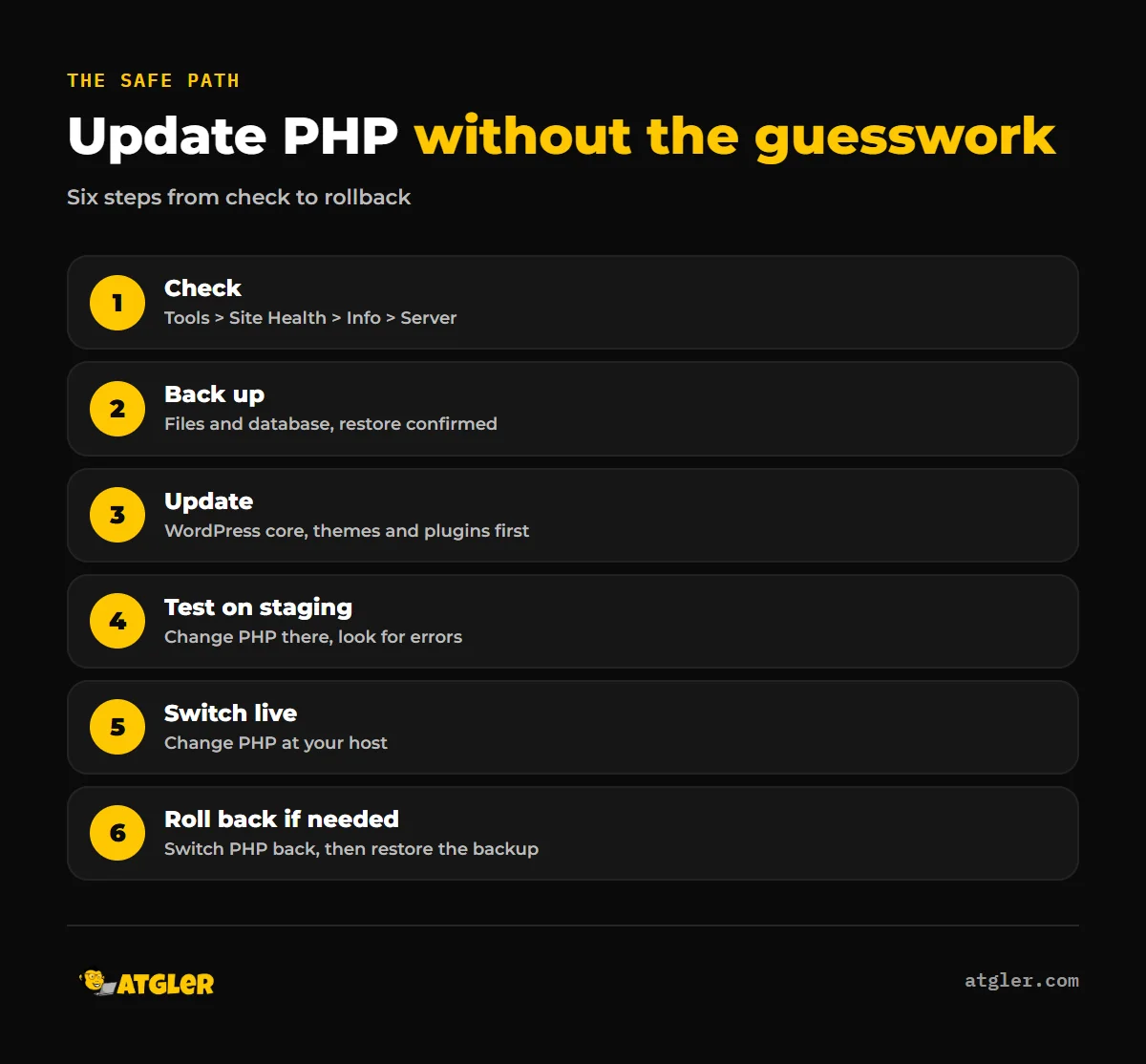
Follow these five steps in order. They cover most sites.
- Check your current version. In WordPress, go to Tools > Site Health > Info > Server. According to WordPress.org, if it already shows 8.3 or higher, you do not need to update.
- Back up files and the database. Confirm you can actually restore from it.
- Update WordPress core, themes and plugins before touching PHP.
- Change PHP on a staging copy first if your host offers one, then test. If it works, change PHP on the live site.
- If something breaks, switch PHP back at your host, and restore the backup if the site is still damaged.
When does PHP 8.2 reach end of life?
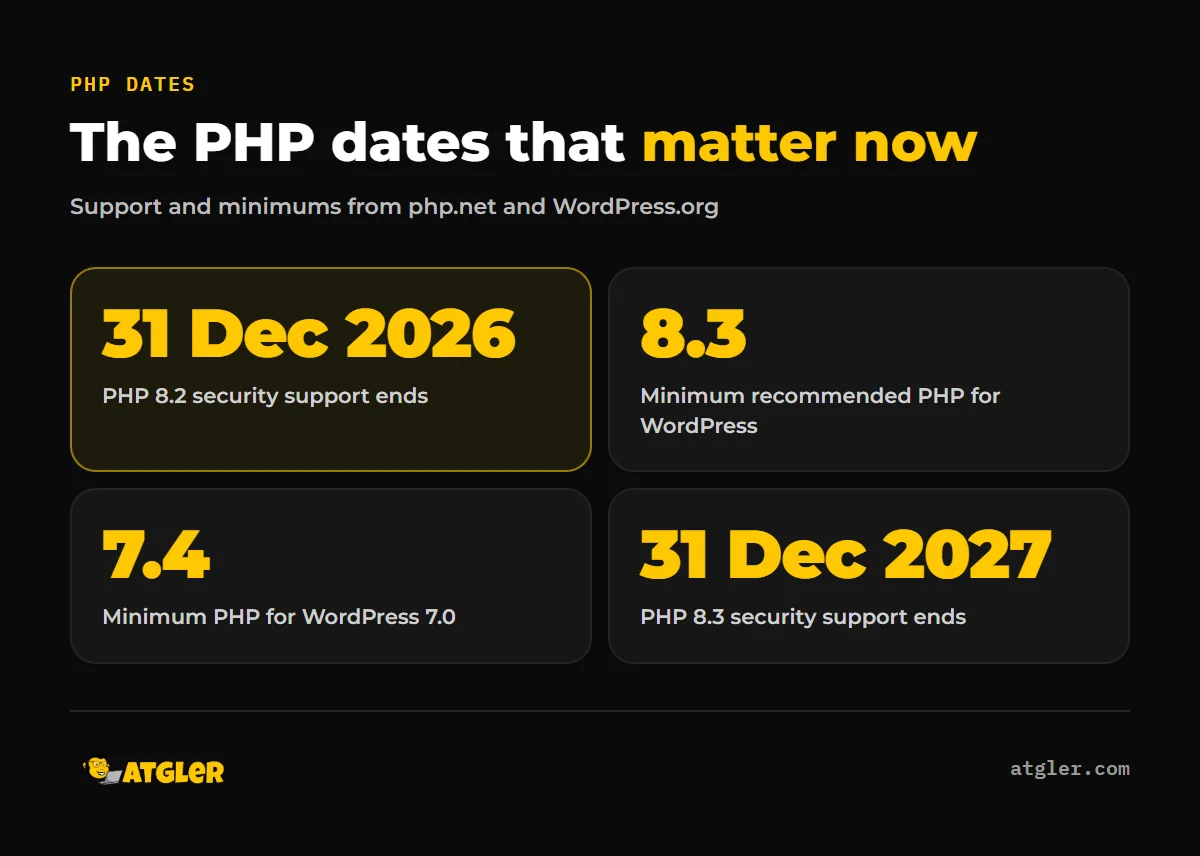
PHP 8.2 security support ends on December 31, 2026, according to the PHP Group’s Supported Versions page. Active support for 8.2 already ended on December 31, 2024. PHP’s policy is two years of active support, then two more years of security-only fixes.
| PHP version | Active support ends | Security support ends |
|---|---|---|
| 8.2 | December 31, 2024 | December 31, 2026 |
| 8.3 | December 31, 2025 | December 31, 2027 |
| 8.4 | December 31, 2026 | December 31, 2028 |
| 8.5 | December 31, 2027 | December 31, 2029 |
PHP 8.1 is already past that point. It reached end of life on December 31, 2025, and the WordPress 7.0 hosting handbook lists 7.4, 8.0 and 8.1 as end-of-life and supported only for backward compatibility. The WordPress.org requirements page warns that these legacy versions “may expose your site to security vulnerabilities.”
Nothing in the schedule says your site stops working on January 1. It means the PHP project stops issuing security fixes for the 8.2 branch, so any new flaw there stays unpatched. Sites on 8.2 should plan a move before the year ends.
Do plugins really require PHP 8.3 now?
Not as a verified, across-the-board rule. What can be confirmed is narrower, and it still points the same way.
- WordPress core’s minimum recommended PHP version is 8.3, according to the core announcement of January 9, 2026.
- The WordPress.org requirements page (last modified May 7, 2026) recommends PHP 8.3 or newer.
- WooCommerce “recommends PHP 8.3 or greater,” but its current releases (10.8, for example) still require PHP 7.4.
So the pressure is real, but much of it is a recommendation, not a hard block. No official WordPress source documents a wave of plugins moving to a strict 8.3 minimum. Individual plugins set their own minimums, so check each one’s listing before you switch.
WordPress itself has also moved. WordPress 7.0 was released on May 20, 2026, and its minimum is PHP 7.4. Core dropped PHP 7.2 and 7.3 because their usage fell “below 4% of monitored WordPress installations,” and the project has historically treated usage below 5% as the point where a version can be considered for retirement. Sites on 7.2 or 7.3 stay on the 6.9 branch.
Which PHP version should you choose: 8.3, 8.4 or 8.5?
The official WordPress pages do not agree on one number. The requirements page and core announcement say 8.3, while the 7.0 hosting handbook recommends 8.4.x and 8.5.x for new installations. A fair reading is 8.3 as the minimum recommended, 8.4 or 8.5 preferred.
The compatibility facts from the WordPress core handbook (updated November 4, 2026):
- PHP 8.3 became fully compatible in WordPress 6.8 (July 2025).
- WordPress 6.8 and 6.7 support PHP 7.2 through 8.4. WordPress 6.9 supports 7.2 through 8.5.
- WordPress 7.0 and 7.1 support PHP 7.4 through 8.5.
Our recommendation: aim for 8.4 if everything passes on staging, and use 8.3 as the fallback if a plugin objects. 8.3 has already left active support but gets security fixes until December 31, 2027. 8.4 is supported with security fixes until December 31, 2028. One caution: Kinsta, a managed host, says PHP 8.4 triggers a deprecation affecting some popular plugins, naming Yoast SEO, WooCommerce PayPal Payments, Easy WP SMTP and MailPoet. That is vendor-reported, so confirm against each plugin’s changelog and your own staging test.
How do you check compatibility and back up first?
Update everything first, then check what is left. WordPress.org’s guide puts updating WordPress, themes and plugins ahead of the PHP change, because current versions are the most likely to support a newer PHP.
Then list every active plugin and your theme, and check each one’s stated PHP support. Replace anything that is abandoned or does not support the PHP version you are aiming for. Atgler has worked with WordPress for 7 years and has built, managed and maintained more than 600 sites. In that work, a dependent plugin or theme that does not support the latest PHP or WordPress version is the most common cause of layout or function problems after an update. A broken theme does not get patched again and again; we advise rebuilding it. Our WordPress update checklist covers the wider routine.
Take a full backup of files and database, stored off the server. Know how you would restore it, and see how to restore WordPress backup files and database before you need it. We have seen a backup plugin silently disconnect, which stopped both backups and downtime alerts, so confirm the backup date before you start.
How do you update PHP version on WordPress and test it?
You change it in your hosting control panel, not inside WordPress. Menus differ by host, and we could not verify instructions for cPanel, Hostinger, SiteGround or others, so look for a PHP version or PHP settings option in yours.
Kinsta’s walkthrough gives one concrete example. In MyKinsta you open WordPress Sites, pick the environment, go to Tools, and use Change under PHP settings. It says this takes up to three minutes and restarts PHP. The same pattern applies anywhere: do it on staging first.
Then test properly:
- Load the homepage, a few inner pages, the login screen and the admin dashboard.
- Submit a contact form and, on a store, run a test checkout.
- Watch for a 500 error or a white screen. Our guide to the WordPress white screen of death covers causes and fixes.
- If something fails, disable plugins one at a time to isolate the fault, check the error logs, and turn on WP_DEBUG temporarily, as Kinsta suggests.
Fix or replace what fails, then repeat the change on the live site, ideally at a quiet hour.
How do you roll back if the site breaks?
Change PHP back to the previous version in your hosting panel, or ask the host to do it. WordPress.org notes that the web host must also move PHP back to revert, so reverting inside WordPress alone will not work.
If the site still misbehaves after PHP is back, restore the backup you took. A “critical error” message usually points to a plugin or theme, and our fix for the critical error message walks through finding it. Restoring a site exactly as it was is not always possible if data was lost, which is why the backup comes first.
If your host only offers PHP 7.x or 8.0, ask them directly when 8.3 or newer will be available. The 7.0 hosting handbook tells hosts still offering 7.2 or 7.3 as a default to move those sites to a supported version. Whether your host will, and when, is something only they can answer.
What the evidence does not tell you
- Speed gains. Kinsta’s own benchmarks (vendor-reported) show WooCommerce handling about 23% more requests per second on PHP 8.2 than on 7.4, and over 60% more on 8.5. Independent figures were not available, and your results depend on your plugins and hosting.
- Current PHP share. The WordPress.org stats page did not return the percentage of sites on 8.2, 8.3 and 8.4, so we cannot say how many sites are still on 8.2.
- Specific breakages. We did not review the PHP 8.3 or 8.4 migration guides for individual deprecations, so staging remains your real test.
- Plugin blocking. We could not confirm from a primary source exactly how WordPress behaves when a plugin declares a higher PHP requirement than your server meets.
- Version 7.1 timing. The core table lists WordPress 7.1 as supporting PHP 7.4 to 8.5, but we did not verify its release date.
When should you get help with a PHP update?
Get help if you have no staging option, run a store, or depend on a theme or plugin that may not support newer PHP. Atgler’s site update service exists for these cases, and our website care plans include weekly updates of plugins, themes and core, with a check that the site works after each update. Either way, a test on staging and a confirmed backup come before any change.
Frequently asked questions
How do I check which PHP version my WordPress site is running?
In your dashboard, go to Tools > Site Health > Info > Server. The PHP version is listed there. If it already shows 8.3 or higher, WordPress.org says no update is needed.
Is it safe to update to PHP 8.3 or 8.4 without breaking my site?
It is safe when you prepare for it. Update WordPress, themes and plugins first, take a backup, and test on staging. Incompatible plugins or themes are the usual cause of problems, so replace anything that does not support the new version.
Do I need a staging site?
WordPress.org suggests updating PHP on staging first if your host offers it. Without staging, take a full backup and make the change during a quiet period, with the previous PHP version ready to switch back to.
What happens if I stay on PHP 7.2 or 7.3 when WordPress 7.0 is out?
WordPress 7.0 dropped PHP 7.2 and 7.3 and requires 7.4 at minimum. Per the core announcement, sites on 7.2 or 7.3 stay on the 6.9 branch.
Does updating PHP make WordPress faster?
Possibly. Kinsta’s vendor-reported benchmarks show WooCommerce handling more requests per second on newer PHP, but independent figures were not found and your results will vary.
Sources
- PHP Group: PHP: Supported Versions (checked November 18, 2026)
- WordPress.org: Requirements (last modified May 7, 2026)
- Make WordPress Core: PHP Compatibility and WordPress Versions (last updated November 4, 2026)
- Make WordPress Core: Dropping support for PHP 7.2 and 7.3 (January 9, 2026)
- Make WordPress Hosting Handbook: WordPress 7.0 compatibility (WordPress 7.0 released May 20, 2026)
- WordPress.org Support: Update PHP (last modified July 29, 2026)
- WooCommerce Docs: Update PHP in WordPress (undated, vendor documentation)
- Kinsta: How to update PHP in WordPress (last updated June 8, 2026, vendor-reported benchmarks)