

On this page
- How do you redesign a website without losing rankings?
- What goes on a website redesign checklist before you start?
- How do you map old URLs and set up 301 redirects in a redesign?
- How do you keep a staging site out of Google?
- What content, internal links and schema should carry over?
- What belongs on the website redesign checklist for launch and the first 90 days?
- What does the evidence not tell you?
- Do you need help running a website redesign?
- Frequently asked questions
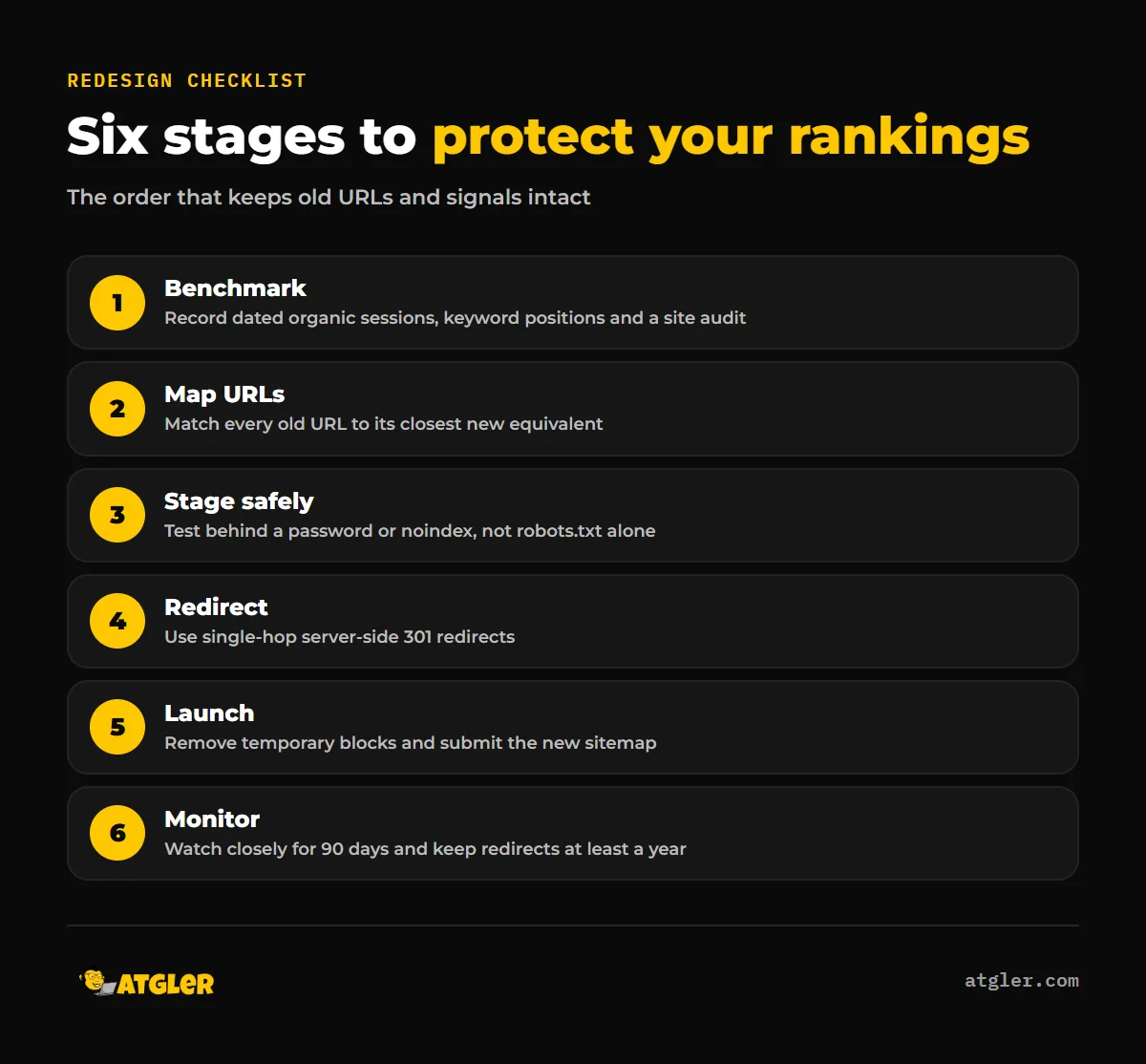
A website redesign checklist protects your rankings by keeping the value of every old URL intact: benchmark current performance, map each old URL to a new one, use server-side 301 redirects, keep staging out of Google, and monitor after launch. Google’s site move guidance says to expect temporary ranking fluctuation, so the goal is to limit the dip, not pretend it cannot happen.
This article walks through benchmarking, URL mapping, redirects, content, schema, staging, launch and post-launch monitoring. If you want a team to run it for you, see our website redesign service.
How do you redesign a website without losing rankings?
You keep the signals that already earn your traffic (URLs, content and internal links) and move them deliberately instead of rebuilding from scratch. Google has no dedicated page for redesigns, so this checklist applies its site move guidance, which covers URL changes, to a redesign. That is an inference, though a sensible one.
The short version:
- Record a dated baseline of organic sessions, keyword positions and a site audit.
- Build a one-to-one map from every old URL to its new equivalent.
- Build and test on a staging site that Google cannot index.
- Launch with single-hop server-side 301 redirects and a new sitemap.
- Monitor closely after launch and keep redirects for at least a year.
The sections below take each step in order, with the details that matter.
What goes on a website redesign checklist before you start?
Start with a dated baseline, because without one you cannot tell whether the redesign hurt you or whether traffic moved for other reasons. SEOmator’s 24-step migration checklist, which is a vendor checklist and not Google guidance, begins the same way.
Capture these before any design work is signed off:
- Organic sessions for a recent period, with the date range noted.
- Keyword positions for the pages that bring in leads or sales.
- A full crawl of the current site, saved so you can compare it with the new one.
- A complete inventory of every live URL, which becomes the start of your URL map.
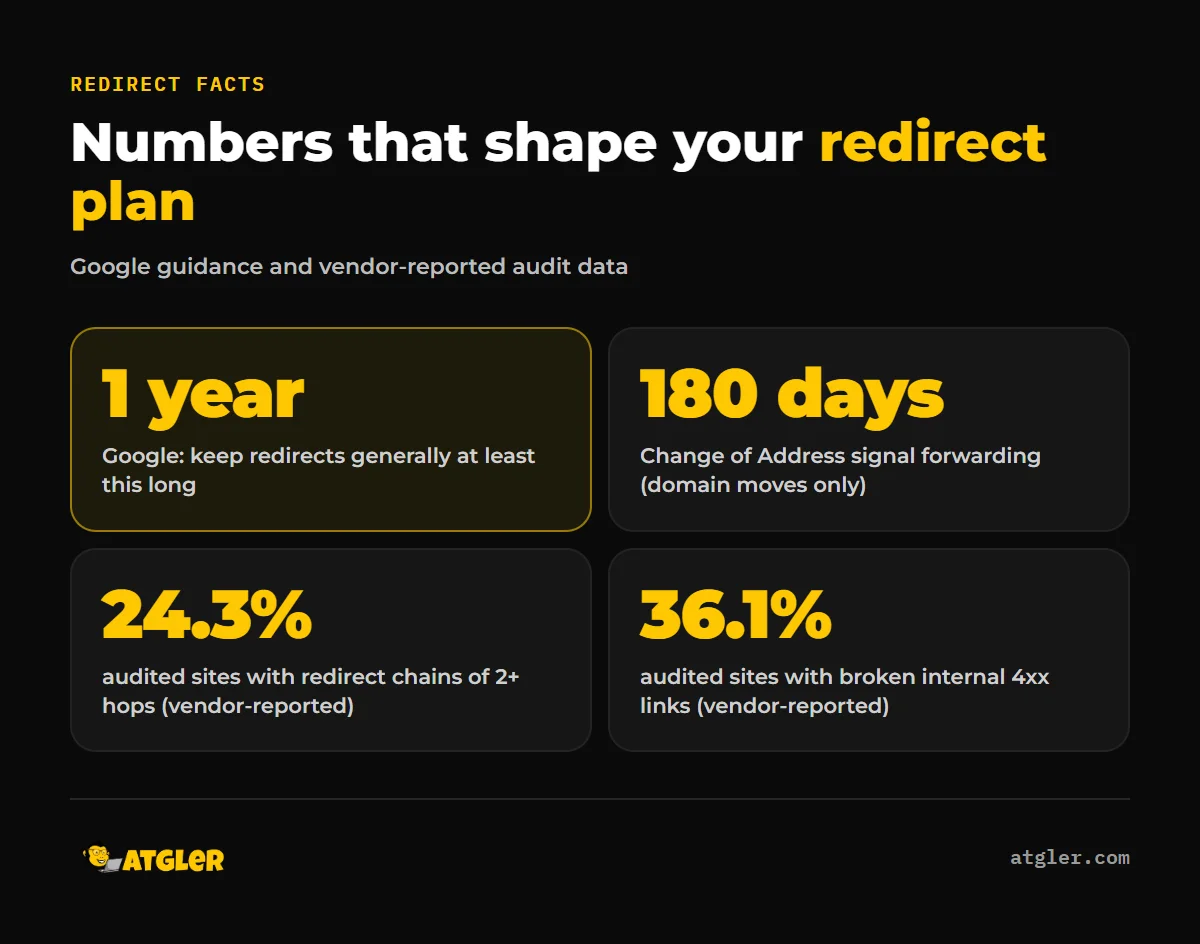
The crawl matters because old sites tend to carry hidden problems. SEOmator’s own audit data (vendor-reported, from its audit panel, and the vendor says it does not represent the web as a whole) found 24.3% of audited sites had redirect chains of two or more hops, 36.1% had broken internal links with a median of 14 per site, and 22.8% had orphan pages. Those numbers are not a forecast for your site, but they show what a crawl tends to uncover. If you want a starting snapshot, our AI website audit is one place to begin.
How do you map old URLs and set up 301 redirects in a redesign?
List every old URL beside the closest new page, then implement that list as server-side permanent redirects. Google’s site move documentation recommends exactly this: redirect each old URL to its final destination directly, avoid chains, and do not send many old URLs to one irrelevant page such as the new home page.
A few practical rules follow from that:
- Every old URL gets a row, including blog posts, category pages and old landing pages.
- If a page is being removed, pick the most relevant surviving page as its target, not the home page.
- Test that each redirect lands on the final URL in one hop.
- Update internal links to point at the new URLs directly, so your own site does not rely on redirects.
The type of redirect matters. This table summarizes Google’s Redirects and Google Search documentation.
| Redirect type | What Google does | Use in a redesign? |
|---|---|---|
| 301 or 308 (permanent, server-side) | Shows the new target in search results | Yes, the default |
| 302, 303 or 307 (temporary) | Shows the source page; not used as a signal that the target is canonical | No, unless the move is truly temporary |
| Instant (0-second) meta refresh | Treated as permanent | Only if server-side is impossible |
| Delayed meta refresh | Treated as temporary | No |
| JavaScript redirect | Rendering may fail, so Google might never see the redirect | Last resort |
How long should you keep the redirects?
Google’s site move page says to keep redirects for as long as possible, generally at least one year. Its Change of Address help page gives a different figure: signals are forwarded for 180 days, and redirects should stay at least that long, longer if you still get Google Search traffic through them. The two do not truly conflict. Plan for the one-year figure, because the 180 days is the tool’s minimum, not a target.
That tool is also only for moving from one domain or subdomain to another. A redesign on the same domain that changes URL paths does not need it.
How do you keep a staging site out of Google?
Put it behind password protection or use a noindex rule, and do not rely on robots.txt alone. Google’s robots.txt documentation says robots.txt is not a mechanism for keeping a page out of Google, and a disallowed URL can still be indexed, without a description, if other sites link to it.
Google’s guidance for moves without URL changes says test copies should use a noindex rule in the HTML or HTTP headers. SEOmator’s checklist (vendor) goes further and recommends blocking staging with HTTP authentication. Either approach is fine. What matters is the next step: any temporary noindex tag or robots.txt block that existed only for the build must be removed before launch, as Google’s site move pages state.
This is one of the easiest launch mistakes to make, because the setting is invisible to visitors. Put its removal on the launch checklist as its own line.
What content, internal links and schema should carry over?
Carry over as much of what already ranks as you can, in the same place, and make sure structured data matches what visitors actually see. Google’s site move pages do not cover content or internal linking, so treat the content advice here as practical judgment, not Google rules.
Use your URL inventory to mark each page as keep, merge or remove. Pages you merge or remove still need a relevant redirect target. Check that no important page ends up orphaned in the new navigation, since SEOmator’s vendor data found 22.8% of audited sites had orphan pages.
For schema, Google’s structured data guidelines are clear on two points. JSON-LD is the recommended format, with Microdata and RDFa also supported. And Google says not to mark up content that is not visible to readers of the page; markup must be a true representation of the page. In a redesign, that means two checks:
- If the old theme or a plugin produced your schema, confirm the new build still outputs it.
- If the new design drops a section, such as reviews or an FAQ, remove the markup that described it.
What belongs on the website redesign checklist for launch and the first 90 days?
On launch day, switch off anything temporary, switch on the redirects, and tell Google where the new pages are. Work through this list:
- Remove migration-only noindex tags and robots.txt blocks.
- Turn on the 301 redirects and spot-check old URLs for a single hop to the right page.
- Submit the new sitemap in Google Search Console. Google says the old sitemap can then be removed.
- Use the URL Inspection tool to confirm Googlebot can reach the new site.
- Confirm your Search Console verification still works.
If the launch also changes hosting, Google’s no-URL-change guidance adds lowering DNS TTLs at least a week before the move and expecting a temporary drop in crawl rate right after launch. That page covers hosting changes, not redesigns specifically.
After launch, expect movement. Google says to expect temporary ranking fluctuation, that medium-sized sites can take “a few weeks or more” for the new URLs to show gradually, and that larger sites take longer. A move is complete only once Googlebot has visited every old and new URL at least once.
For a monitoring rhythm, SEOmator’s vendor checklist suggests daily checks in days 1 to 7, two or three times a week in days 8 to 30, weekly in days 31 to 90, and a re-audit against your baseline on day 90. That cadence is vendor opinion, not Google guidance, but it is a reasonable structure. On each check, compare organic sessions and key rankings with your baseline, and look for new 404s and redirect chains.
What does the evidence not tell you?
It does not give you a reliable number for how much traffic a same-domain redesign will lose or how long recovery takes. Google does not publish one.
The most-cited recovery figure comes from a Search Engine Journal study by Dan Taylor of 10 Spurs, published January 8, 2025. It looked at 892 domain migrations, with data collected on October 22, 2024. On average, the new domain took 523 days to match the old domain’s estimated organic traffic, 17% had not returned to the same level after 1,000 days, and the fastest recoveries took 19, 22, 23 and 33 days. Treat it with care:
- These are domain migrations, not same-domain redesigns.
- Traffic was estimated by third-party tools, mostly Ahrefs, plus community-submitted cases.
- The study’s own earlier figure (a smaller sample of 171 migrations) was different, and the article does not explain the gap.
It shows that recovery can vary enormously, not what yours will look like. Also note that the Google pages cited here show no last-updated date, so check them directly for current wording before you launch.
Do you need help running a website redesign?
A redesign touches design, redirects, staging, schema and monitoring all at once, and a missed step is hard to spot until traffic moves. Atgler has worked with WordPress for 7 years and has built, managed and maintained more than 600 sites. Our website redesign service starts from $799, and we can’t promise rankings, only a careful process. For more background, read how to migrate a WordPress site without losing rankings and the signs your WordPress site needs a redesign, or talk to us about SEO services after launch.
Frequently asked questions
Do I need 301 redirects if my URLs stay the same?
Redirects are for URLs that change or disappear. A page that keeps its exact URL needs none, but any page that moves or is removed needs a redirect to a relevant new page.
Should I use a 301 or 302 redirect when relaunching?
Use a 301 (or 308). Google’s documentation says permanent redirects show the new target in search results, while temporary redirects show the source page and are not used as a canonical signal.
Do I need the Change of Address tool for a redesign?
No, not if you stay on the same domain. Google says the tool is only for moves from one domain or subdomain to another.
How long should I keep redirects in place?
Google says generally at least one year, and as long as possible. Its Change of Address page gives 180 days as the minimum for that tool, so one year is the safer plan.
Will a redesign hurt my rankings?
Google says to expect temporary fluctuation during a site move, and it publishes no figure for how large or long it will be. Careful URL mapping, redirects and monitoring are what limit the damage.
How do I stop a staging site from being indexed?
Use password protection or a noindex rule. Google says robots.txt is not a way to keep a page out of search results, because a blocked URL can still be indexed if other sites link to it.
Sources
- Google Search Central: Site move with URL changes (no last-updated date shown; checked November 18, 2026)
- Google Search Central: Redirects and Google Search (no last-updated date shown; checked November 18, 2026)
- Google Search Console Help: Change of Address tool (no effective date shown; footer reads 2026)
- Google Search Central: Site move without URL changes (no last-updated date shown; checked November 18, 2026)
- Google Search Central: Introduction to robots.txt (no last-updated date shown; checked November 18, 2026)
- Google Search Central: General structured data guidelines (no last-updated date shown; checked November 18, 2026)
- Search Engine Journal: How long should an SEO migration take (study by Dan Taylor, 10 Spurs) (published January 8, 2025; domain migrations, third-party traffic estimates)
- SEOmator: Website Migration Checklist for SEO: 24 Steps (published November 23, 2023, updated August 5, 2026; vendor-reported)