
On this page
- What counts as a slow WordPress site?
- How to find out why your WordPress site is slow
- Cause 1: Slow or overloaded hosting
- Cause 2: An outdated PHP version slowing your WordPress site
- Cause 3: No caching
- Cause 4: Oversized images on a slow WordPress site
- Cause 5: Heavy plugins that make a WordPress site slow
- Cause 6: A bloated theme that makes your WordPress site slow
- Cause 7: Render-blocking CSS, JavaScript and third-party scripts
- Cause 8: No CDN for global visitors
- Cause 9: A bloated database slowing your WordPress site
- Cause 10: Layout shifts and slow interactions
- What to fix first
- When to get help with a slow WordPress site
- Frequently asked questions
A slow WordPress site is almost never caused by one thing. It’s usually a stack of small problems: a busy server, an old PHP version, no caching, one oversized image, a few heavy plugins and a pile of third-party scripts. The good news is that most of them are fixable, and you can find the biggest culprit in about ten minutes if you measure first and guess second.
This guide explains why your WordPress site is slow, how to diagnose it with free tools, and the ten most common causes in the order we’d check them. It also covers what you can fix yourself and when it’s worth getting help. Speed isn’t only a visitor-experience issue. Google measures it through Core Web Vitals, and the thresholds are specific, so we’ll start there.
What counts as a slow WordPress site?
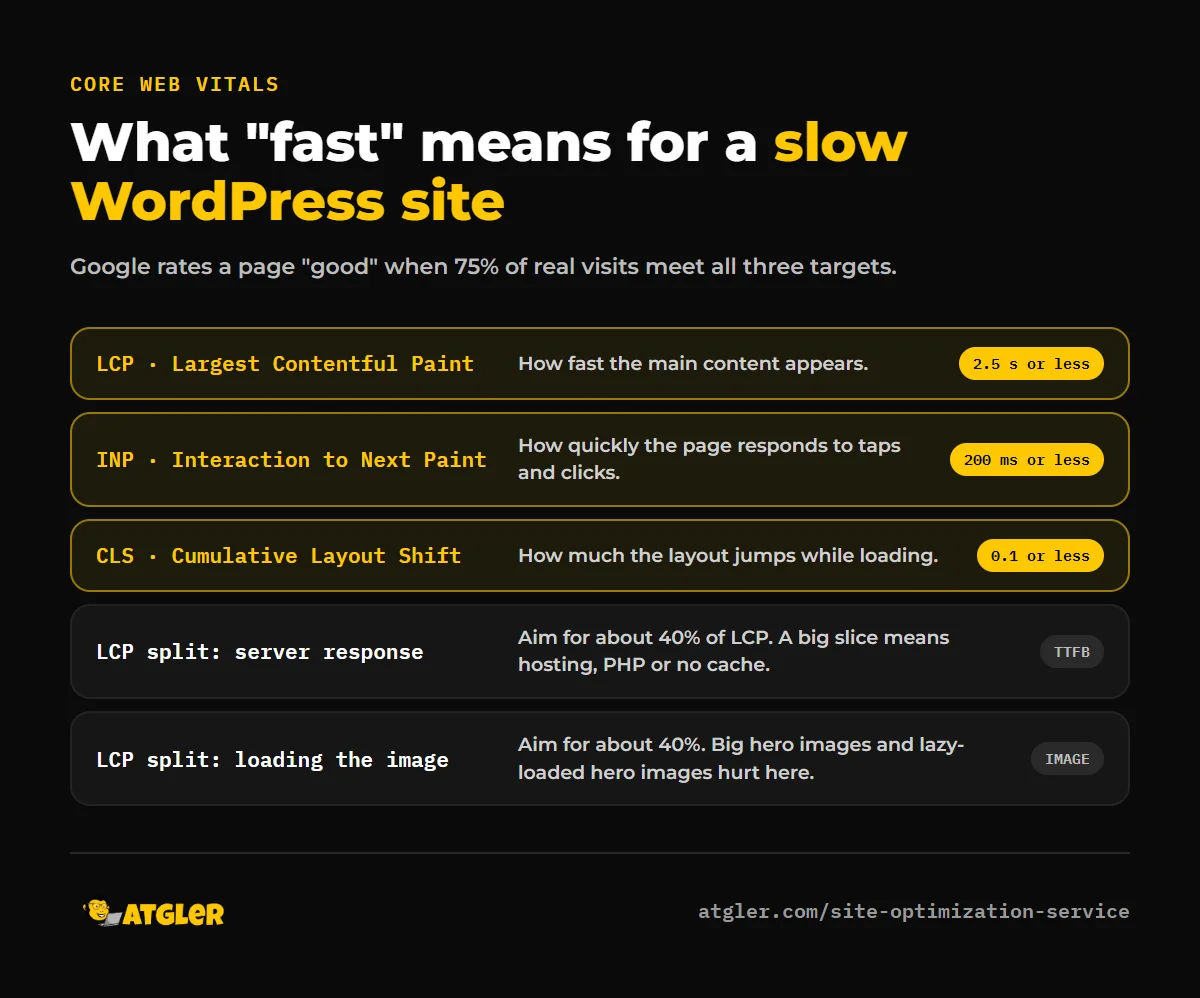
Google’s Core Web Vitals give you concrete targets. A page is rated “good” when, for at least 75% of real visits (measured separately on mobile and desktop):
- Largest Contentful Paint (LCP), how fast the main content appears, is 2.5 seconds or less.
- Interaction to Next Paint (INP), how quickly the page responds to taps and clicks, is 200 milliseconds or less.
- Cumulative Layout Shift (CLS), how much the layout jumps around, is 0.1 or less.
If your site misses those, it’s slow by Google’s definition, whatever it feels like on your own fast connection. Speed also affects results: in a web.dev case study of Vodafone, a 31% improvement in LCP led to 8% more sales in an A/B test. Your results will differ, but the direction is consistent: faster pages convert better.
How to find out why your WordPress site is slow
Before changing anything, get a baseline:
- PageSpeed Insights. Enter your URL and look at the “Discover what your real users are experiencing” section first. That’s field data from real visitors. The lab test below it is useful for finding specific problems, but field data tells you whether you actually have one.
- Search Console’s Core Web Vitals report shows which groups of pages fail, using the same field data.
- Look at the LCP breakdown. web.dev splits LCP into four parts: server response time (TTFB), resource load delay, resource load duration and element render delay. As a rough guide, about 40% should be TTFB and about 40% resource loading, with the other two parts under 10% each. If TTFB is the big slice, the problem is your server or caching. If resource loading is, it’s usually images.
- Query Monitor is a free plugin that shows slow database queries and which plugin or theme caused them. Install it temporarily on a staging copy if you can.
- Test logged out and on mobile. Admin-only slowness and visitor slowness have different causes.
Cause 1: Slow or overloaded hosting
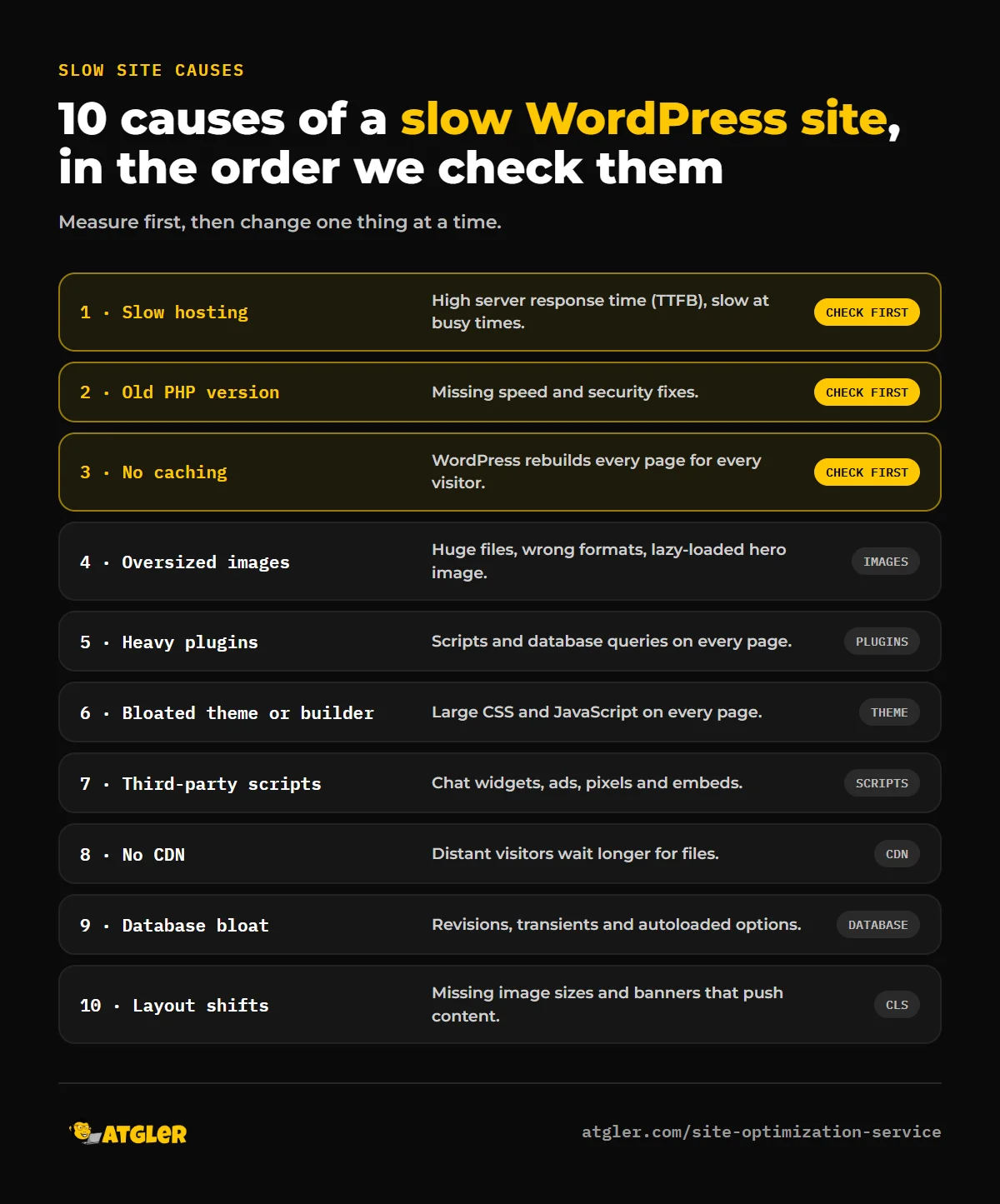
If your server takes a long time to respond, nothing you do in the browser can fully make up for it. Signs include a high TTFB in PageSpeed Insights, slowness at busy times, and a slow admin area. Cheap shared hosting that packs hundreds of sites on one server is the usual cause. Fixes: move to a better plan or a host with built-in server-level caching, and ask your host about PHP workers and resource limits.
Cause 2: An outdated PHP version slowing your WordPress site
WordPress’s own requirements page recommends hosting that supports PHP 8.3 or greater, MariaDB 10.11+ or MySQL 8.0+, and HTTPS. According to php.net, only PHP 8.2 and newer still receive security fixes, and 8.2’s security support ends on December 31, 2026. If your host is running an older version, you’re missing both speed and security fixes. In most hosting panels, you can switch PHP version in a few clicks. Back up first and test, because old plugins can break on new PHP.
Cause 3: No caching
Without caching, WordPress rebuilds every page from the database on every visit. A page cache stores the finished HTML and serves it instantly. For most sites, adding caching is the single biggest speed improvement for the least effort. Check whether your host already provides it before installing a plugin, and see our comparison of WordPress caching plugins for how to choose.
Cause 4: Oversized images on a slow WordPress site
Images are the most common LCP element. Problems to look for:
- Photos uploaded at camera size (4,000 pixels wide) and displayed at 800.
- JPEG and PNG files that could be WebP or AVIF.
- Lazy-loading the main image. web.dev says never to lazy-load your LCP image. Lazy loading is for images below the fold.
- No priority hint on the hero image. web.dev recommends
fetchpriority="high"on the one image likely to be the LCP element, and preloading it if it’s referenced only from CSS or JavaScript.
Cause 5: Heavy plugins that make a WordPress site slow
The number of plugins matters less than what each one does. A lightweight plugin that adds a setting costs almost nothing. A plugin that loads scripts and styles on every page, runs heavy database queries or calls external services on every request can slow the whole site. Use Query Monitor to see which plugins are responsible, deactivate suspects one at a time on a staging copy, and replace heavy ones with lighter alternatives. Also delete plugins you aren’t using. Inactive plugins don’t slow the site, but they are a security risk, and you can read why in our security plugins guide.
Cause 6: A bloated theme that makes your WordPress site slow
Some themes and page builders ship large amounts of CSS and JavaScript that every page has to download, even if you use a fraction of it. Symptoms are a high number of requests, large CSS files and layout shifts as the page loads. You don’t always need to rebuild: many builders have performance settings (such as loading assets only where used), and a lightweight theme can reduce the load a lot. If the site’s structure is the problem, a redesign on a lean base may be worth considering. Measure before blaming a tool, because poor setup is often the cause rather than the tool itself.
Cause 7: Render-blocking CSS, JavaScript and third-party scripts
Chat widgets, analytics, ad pixels, social embeds and font services all add requests and can delay rendering or hurt INP. Audit what loads: remove anything you don’t use, load the rest after the page is interactive, and host fonts locally. Be careful with automatic “minify and combine” settings, which can break layouts. Turn them on one at a time and test.
Cause 8: No CDN for global visitors
A content delivery network serves images and files from locations near your visitors. It helps most if your audience is spread across countries or your server is far from them. For a purely local business with a fast host, the benefit is smaller.
Cause 9: A bloated database slowing your WordPress site
Years of post revisions, expired transients, spam comments and leftover plugin data make the database bigger, and options marked “autoload” are loaded on every page request. Cleaning up with a reputable optimization plugin or WP-CLI can help, but back up first, because database changes can’t always be undone. A persistent object cache (such as Redis or Memcached, if your host offers it) helps sites with a lot of dynamic queries.
Cause 10: Layout shifts and slow interactions
Not all slowness is about loading. Ads or banners that push content down cause layout shift (CLS), and heavy JavaScript on a button click causes poor INP. Set explicit width and height on images and embeds, reserve space for banners, and defer non-essential scripts.
What to fix first
| If PageSpeed shows… | Start with |
|---|---|
| High server response time (TTFB) | Caching, PHP version, hosting |
| Slow LCP with a large image | Image size and format, no lazy-load on the hero image, priority hint |
| Poor INP | Remove or defer third-party scripts, check heavy plugins |
| Poor CLS | Image dimensions, reserved space for banners and ads |
| Slow admin only | Plugin conflicts, database size, hosting resources |
Change one thing at a time and retest. If you change five things at once, you won’t know which one helped, or which one broke the site.
When to get help with a slow WordPress site
You can handle caching, images and plugin cleanup yourself. It’s worth getting help when you’ve tried the basics and the site is still slow, when the problem is in the theme or builder, when the site is a store where mistakes cost sales, or when you don’t have a backup or staging copy to test on. Our site optimization service covers this work, and our WordPress care plans keep updates and monitoring going afterwards so speed doesn’t slip again. Also remember that a sudden slowdown can be a sign of a hack: if you see redirects, unknown admin users or spam pages as well, start with our hacked site recovery guide.
Frequently asked questions
Why is my WordPress site so slow all of a sudden?
Common triggers are a new or updated plugin, a traffic spike on shared hosting, a large image or video added to a key page, a server change by your host, or malware. Check what changed first, then test with plugins deactivated on a staging copy.
How fast should a WordPress site load?
Google’s “good” targets are LCP of 2.5 seconds or less, INP of 200 milliseconds or less and CLS of 0.1 or less, measured for 75% of real visits. Those are about real-user experience, so check field data, not just a one-time lab score.
Do too many plugins slow down WordPress?
Not necessarily. What matters is what each plugin loads and runs. A few heavy plugins can slow a site more than thirty light ones. Use Query Monitor to find the specific ones that cost time.
Will a caching plugin make my site faster?
Usually, yes, especially for server response time. Results vary depending on your host, theme and plugins, so measure before and after. Don’t run two page-caching plugins at once.
Is my hosting the reason my WordPress site is slow?
It can be, if the server response time (TTFB) is high even with caching on, or the site slows down at busy times. Ask your host about PHP version, resource limits and server-level caching before assuming you need to move.
Can a slow site hurt my Google rankings?
Core Web Vitals are part of Google’s page experience signals, but content relevance still matters more. Speed matters most when you’re competing against pages of similar quality, and it directly affects whether visitors stay and convert.
Sources
- web.dev: Web Vitals, Optimize Largest Contentful Paint and the Vodafone case study
- WordPress.org: WordPress requirements
- PHP: Supported versions