
On this page
- Key takeaways
- How much does WordPress maintenance cost per month?
- What does WordPress maintenance include at each tier?
- What should a good plan actually do each month?
- Which red flags should you look for in website maintenance packages?
- Is doing WordPress maintenance yourself cheaper?
- What the evidence does not say about WordPress maintenance cost
- Getting help with WordPress maintenance plans
- Frequently asked questions
Typical WordPress maintenance cost runs from roughly $30 to well over $1,000 a month, according to vendor-reported ranges, and the price mostly reflects how much human work is included. Budget plans lean on automation, while higher tiers add staging tests, visual checks and faster response. This article covers what each tier should include, the red flags to avoid, and how a plan compares with doing it yourself.
We publish our own prices on our Website Care & Maintenance page, and we use them below as a worked example. Every market figure in this article comes from a company that sells hosting or maintenance, so treat the ranges as a guide, not a benchmark.
Key takeaways
- Vendor-reported ranges run from $30 to $1,000+ a month, and no independent survey with a stated method was found.
- Price tracks human work: cheaper plans often automate updates with little review, while higher tiers add staging, visual testing and faster response.
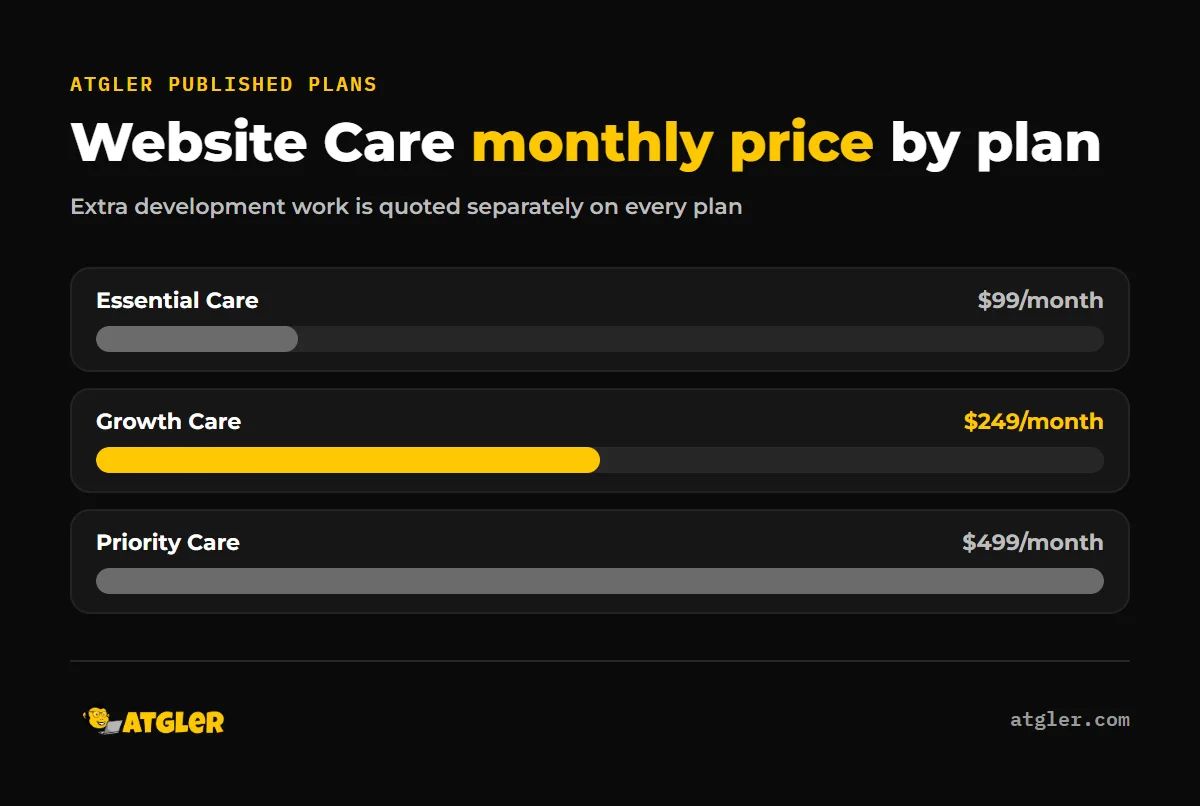
- Atgler’s Website Care plans are $99, $249 and $499 a month, and none include a set number of development hours.
- The biggest red flags are updates pushed straight to the live site, backups on the same server, and fixes or cleanup billed as extras.
- DreamHost (vendor-reported) estimates DIY at $0 to $105 a month in tools plus 2 to 8 hours of your own time.
How much does WordPress maintenance cost per month?
Vendor-published ranges for WordPress maintenance plans cluster between $30 and $1,000 a month, and each vendor draws its tiers in a different place. Pantheon states that maintenance runs “from $30/month to $5,000+/month”, while DreamHost says plans are “typically priced from around $50 to over $1,000 per month”.
| Source (vendor-reported) | Tier | Monthly price |
|---|---|---|
| Pantheon | Budget | $30 to $100 |
| Pantheon | Mid-tier | $100 to $300 |
| Pantheon | Premium | $300 to $1,000+ |
| DreamHost | Set-and-Forget | $75 to $150 |
| DreamHost | Growing Business | $100 to $300 |
| DreamHost | Revenue Generator | $300 to $1,000 |
| Codeable | Basic / Advanced / Enterprise | $140 / $590 / $1,000+ |
Online stores cost more. Pantheon puts WooCommerce maintenance at about $500 a month and above, and over $3,000 for larger stores. If you run a shop, our comparison of WooCommerce and Shopify covers the wider cost picture.
What does WordPress maintenance include at each tier?
What WordPress maintenance includes depends mostly on how much a person looks at your site before and after each change. The sources describe the tiers like this:
- Budget ($30 to $100): Pantheon says many plans at $30 to $50 run fully automated updates with little or no human review.
- Mid-tier ($100 to $300): DreamHost describes biweekly updates with staging tests, daily backups with restoration verification, and a 24-hour response.
- Premium ($300 to $1,000+): DreamHost lists staging for all updates, 24/7 priority support and 2-hour response guarantees. Pantheon adds that premium plans often use visual regression testing.
Codeable’s Basic plan at $140 includes 1 hour of developer time, daily verified offsite backups and scheduled malware and vulnerability scans, with cleanup quoted separately. It says every tier includes staging-tested updates, which contradicts Pantheon’s picture of cheap plans. The tiers are not standardized, so compare the actual inclusions, not the plan names.
Where Atgler’s plans sit
All three Atgler plans fall inside the vendor mid-tier ranges. This is what the Website Care page lists, as checked on November 11, 2026:
| Plan | Price | What it includes | Extra work |
|---|---|---|---|
| Essential Care | $99/month | Daily automated backups, 24/7 uptime monitoring, basic malware scanning, email support with 48-hour response | $99/hr |
| Growth Care | $249/month | Adds advanced firewall and hardening, staging, monthly database cleanup, free hacked-site repair, priority support with 24-hour response | $84/hr |
| Priority Care | $499/month | Adds a full visual and function check after major updates, same-day emergency response, a monthly 30-minute strategy call, a dedicated account manager | $74/hr |
Two points matter here. Essential does not list staging, so by the standards above it is an entry-level plan with daily backups and scanning, not a full testing service. And none of the three include a set number of development hours, so extra work is quoted separately, so ask for a written estimate.
What should a good plan actually do each month?
A good plan updates software on a schedule, checks that the site still works afterward, watches for downtime, and shows you a record of what was done. Atgler has worked with WordPress for 7 years and has built, managed and maintained more than 600 sites. Our maintenance routine is weekly updates of plugins, themes and core, uptime monitoring with prompt investigation of downtime, a check that the site works after each update, and a short monthly report covering what was done, backup data and vulnerabilities. Backups and reports use Atgler’s own in-house tool.
Backups deserve extra attention. WordPress.org’s backup handbook says to back up the database regularly and always before an upgrade, weekly for smaller sites and daily for high-activity ones. A full restore needs both the database and the files, and it recommends keeping at least 3 to 5 recent backups in separate locations. It also suggests running an occasional manual backup to confirm the automatic ones work.
That last point is not theoretical. DreamHost (vendor-reported) notes that automation cannot confirm your backups actually restore. We have seen a backup plugin silently disconnect, which stopped both the backups and the downtime alerts. The site was found hacked later. Monitoring that nobody checks is not protection, which is why a report that shows completed work is worth asking for.
Which red flags should you look for in website maintenance packages?
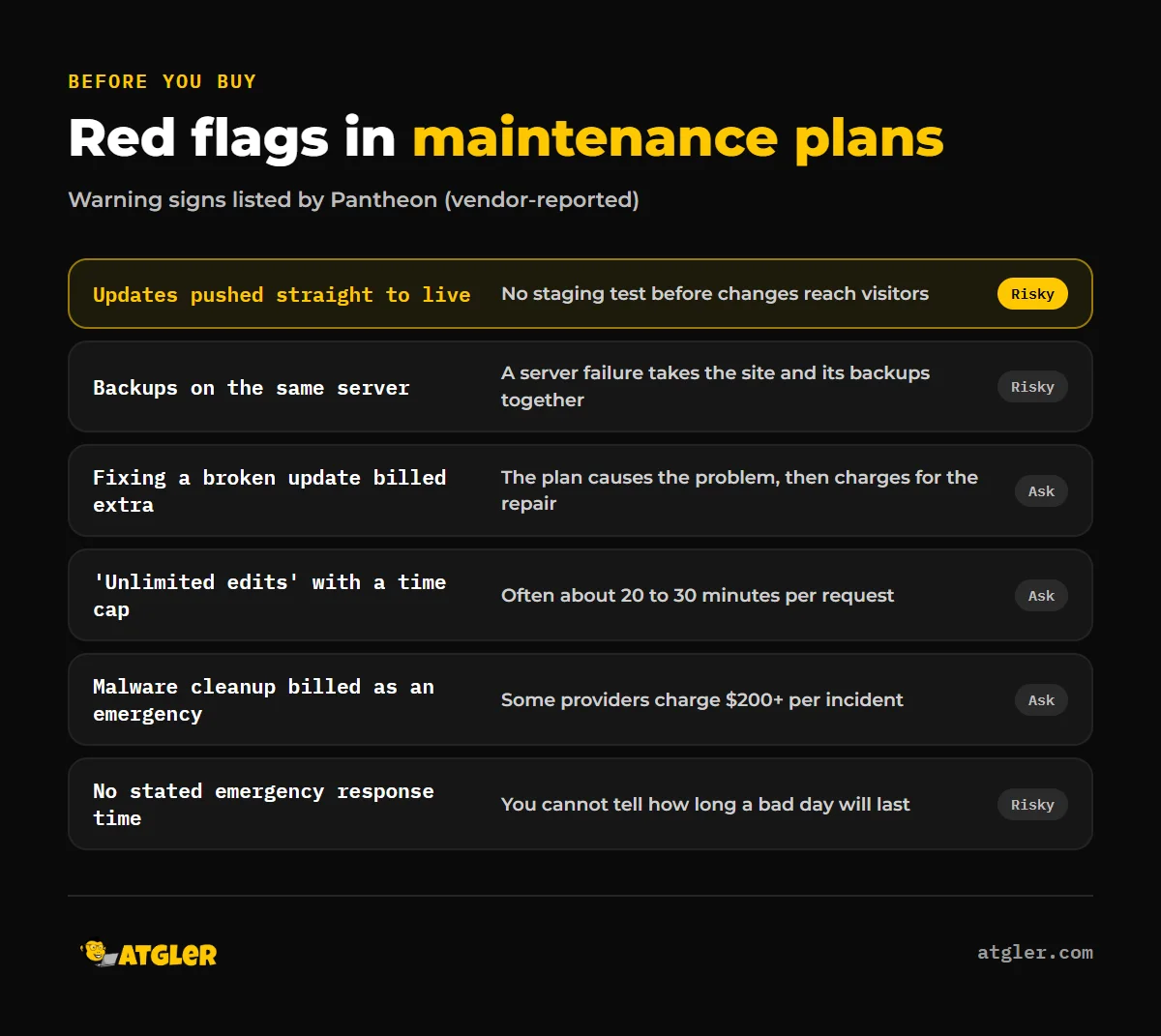
The clearest red flag is an update process with no safety net. Pantheon’s list of warning signs (vendor-reported) is a useful checklist for any quote:
- Updates pushed straight to the live site with no staging.
- Backups stored on the same server as the site.
- Fixing a broken update billed as a separate task.
- “Unlimited edits” capped at about 20 to 30 minutes per request.
- Malware detection without cleanup, or cleanup billed as an emergency fee. Pantheon says some providers charge $200+ per incident.
- No stated emergency response time.
- Reports that show only a generic status instead of completed work.
Before you buy, ask each provider who fixes the site if an update breaks it, whether that is billed, and how long they take to respond, so ask for the exact response time in writing.
Breakages usually have a predictable cause. In our experience, a dependent plugin or theme that does not support the latest PHP or WordPress version is the most common reason for layout or function problems after an update. If a theme is that far behind, we do not patch it again and again. We advise a rebuild, and our guide to signs your site needs a redesign, not just an update explains how to tell the difference.
What does cleanup cost if the site is hacked?
Cleanup is the cost most likely to surprise you. Our Hacked Site Repair is a flat fee of $149 Standard (48 hr) or $249 Priority (24 hr), with a 30-day re-hack guarantee. Growth Care includes hacked-site repair free. A thorough cleanup takes at least 8 hours of work, and hard cases such as sites on old deprecated themes can take up to 50 hours. We do not promise to prove how a site was hacked, and restoring a site exactly as it was is not always possible. For a wider view, see how much WordPress malware removal costs.
Is doing WordPress maintenance yourself cheaper?
Doing it yourself costs less in cash but more in time. DreamHost (vendor-reported) estimates security plugins at $0 to $50 a month, backup services at $0 to $25 and performance tools at $0 to $30, with a combined FAQ figure of $0 to $105 a month. It adds 2 to 8 hours of your own time a month, 2 to 3 for a simple blog and 5 to 8 for a business site. For a weekend blogger it says a DIY setup costs “under $300 yearly, including your hosting”.
For comparison, Atgler Essential at $99 a month is $1,188 a year, before any extra work. Pantheon gives no DIY cost at all, so the sources are not directly comparable. Whether the difference is worth it depends on what your hours are worth and what an outage costs you, and neither figure is verified in any source here.
Two facts help the DIY case. WordPress.org says that since WordPress 3.7, minor and security updates can apply automatically in the background on most sites, though major releases still need you to click “Update Now”. Pantheon also notes that managed hosting typically covers infrastructure such as core updates, daily backups, security monitoring, SSL, CDN and caching, but usually not application-level work like plugin and theme testing, conflict fixes and troubleshooting. DreamHost advises checking what your host already includes before paying for overlapping maintenance.
Pantheon suggests DIY on managed hosting may suit a simple site with few plugins and no custom code, and professional maintenance once the site generates revenue. Remember that Pantheon sells hosting and DreamHost’s pro-DIY figures also come from a host. If you go DIY, our WordPress update checklist walks through a safe routine.
What the evidence does not say about WordPress maintenance cost
The published numbers are thinner than they look. Keep these limits in mind:
- Every price range comes from a vendor. No independent survey with a stated method was found, and Codeable calls its ranges “market-observed” without explaining how they were collected.
- Tier boundaries disagree. Pantheon’s budget tier is $30 to $100, while DreamHost’s starts around $50.
- Pantheon’s article has no publication date, so how current it is cannot be confirmed.
- Typical freelancer hourly rates and the cost of downtime were not verified from any source.
- Atgler’s pricing page shows no effective date, so check current prices before you decide.
For security context, our WordPress security statistics post covers how sites get hacked, and what happens if you never maintain your site covers the downside of doing nothing.
Getting help with WordPress maintenance plans
If you want a person to own updates, backups and monitoring, start with our Website Care plans, which are month to month and begin at $99. Pick the tier by what you need covered, such as staging, response time or free hacked-site repair, and ask us anything the page leaves unclear. If you only need occasional fixes, there is also emergency WordPress support at $99 per hour with no retainer.
Frequently asked questions
Is a $30 to $50 a month maintenance plan worth it?
It can cover basics like backups and scans. Pantheon says many plans at that price run fully automated updates with little or no human review, so check whether staging, restore testing and cleanup are included.
Do I need a maintenance plan for a small brochure site?
Not always. Pantheon suggests DIY may suit a simple site with few plugins and no custom code, and professional maintenance once the site generates revenue.
Does my hosting already include updates and backups?
Often partly. Pantheon says managed hosting typically covers infrastructure tasks like core updates and daily backups, but usually not plugin and theme testing or conflict fixes. Check your host’s inclusions before paying for overlap.
How often should I back up WordPress?
WordPress.org suggests weekly backups for smaller sites and daily for high-activity sites, and always before an upgrade. Keep 3 to 5 recent copies in separate locations and test that a restore works.
Are “unlimited edits” really unlimited?
Not necessarily. Pantheon lists “unlimited edits” capped at about 20 to 30 minutes per request as a red flag, so ask what the real limit is.
Is malware cleanup included in a maintenance plan?
It depends on the plan. Pantheon warns that some providers detect malware but bill cleanup as an emergency fee, with some charging $200+ per incident, so get this in writing.
Sources
- Atgler: Website Care & Maintenance Plans (no pricing date shown, checked November 11, 2026, vendor pricing page)
- Pantheon: What WordPress Maintenance Plans Actually Include and Cost (undated, vendor-reported)
- DreamHost: WordPress Maintenance Plans: What They Cost (and Do You Need One?) (updated August 26, 2026, vendor-reported)
- Codeable: WordPress maintenance pricing (published March 25, 2026, vendor-reported)
- WordPress Developer Resources: Backups (last modified October 28, 2026, official)
- WordPress.org Support: Updating WordPress (last modified November 7, 2026, official)