
On this page
- What WordPress security plugins can and can’t do
- The main types of WordPress security plugins
- Best WordPress security plugins compared
- Wordfence: best all-round choice among WordPress security plugins
- Sucuri Security: the WordPress security plugin for monitoring and remote scanning
- Kadence Security: the WordPress security plugin for login protection
- Defender: the beginner-friendly WordPress security plugin
- All-In-One Security (AIOS): best free toolkit for login, files and spam
- Patchstack: protection for plugin vulnerabilities, not a malware scanner
- MalCare: scanning and cleanup, with vendor-reported numbers
- How to choose between WordPress security plugins
- WordPress security plugins setup checklist
- When a plugin isn’t enough
- Frequently asked questions
The best WordPress security plugins in 2026 are Wordfence, Sucuri Security, Kadence Security (formerly iThemes and Solid Security), Defender, All-In-One Security and Patchstack, but the right one depends on what you need to protect against. Some are firewalls, some are scanners, some only harden your login, and one of them isn’t a scanner at all. Picking the wrong type leaves a gap, even if the plugin itself is excellent.
This guide compares the main options using verified data: install counts, ratings and update dates from the official WordPress.org plugin directory, features from each vendor’s own documentation, and prices from their published pricing pages. We haven’t run lab tests on these plugins, so we don’t rank them by “detection score.” Instead, we explain what each one is designed to do and who it fits. If your site is already infected, a plugin won’t fix it, so start with our guide on what to do when your WordPress site is hacked.
What WordPress security plugins can and can’t do
A security plugin is one layer of defense, not a force field. Understanding that helps you choose well, because the data shows where attacks actually come from. Patchstack’s State of WordPress Security in 2026 report counted 11,334 new WordPress vulnerabilities in 2025. Of those:
- 91% were in plugins and 9% in themes, with only six in WordPress core.
- 46% had no patch from the developer when they were publicly disclosed.
- For heavily exploited vulnerabilities, the median time to mass exploitation was 5 hours.
That means security plugins are valuable mostly because they can block attacks before you’ve had a chance to update. But they can’t make a vulnerable plugin safe, they don’t replace backups, and they won’t clean up a site that’s already compromised. A security plugin works best alongside updates, strong passwords and off-site backups.
The main types of WordPress security plugins
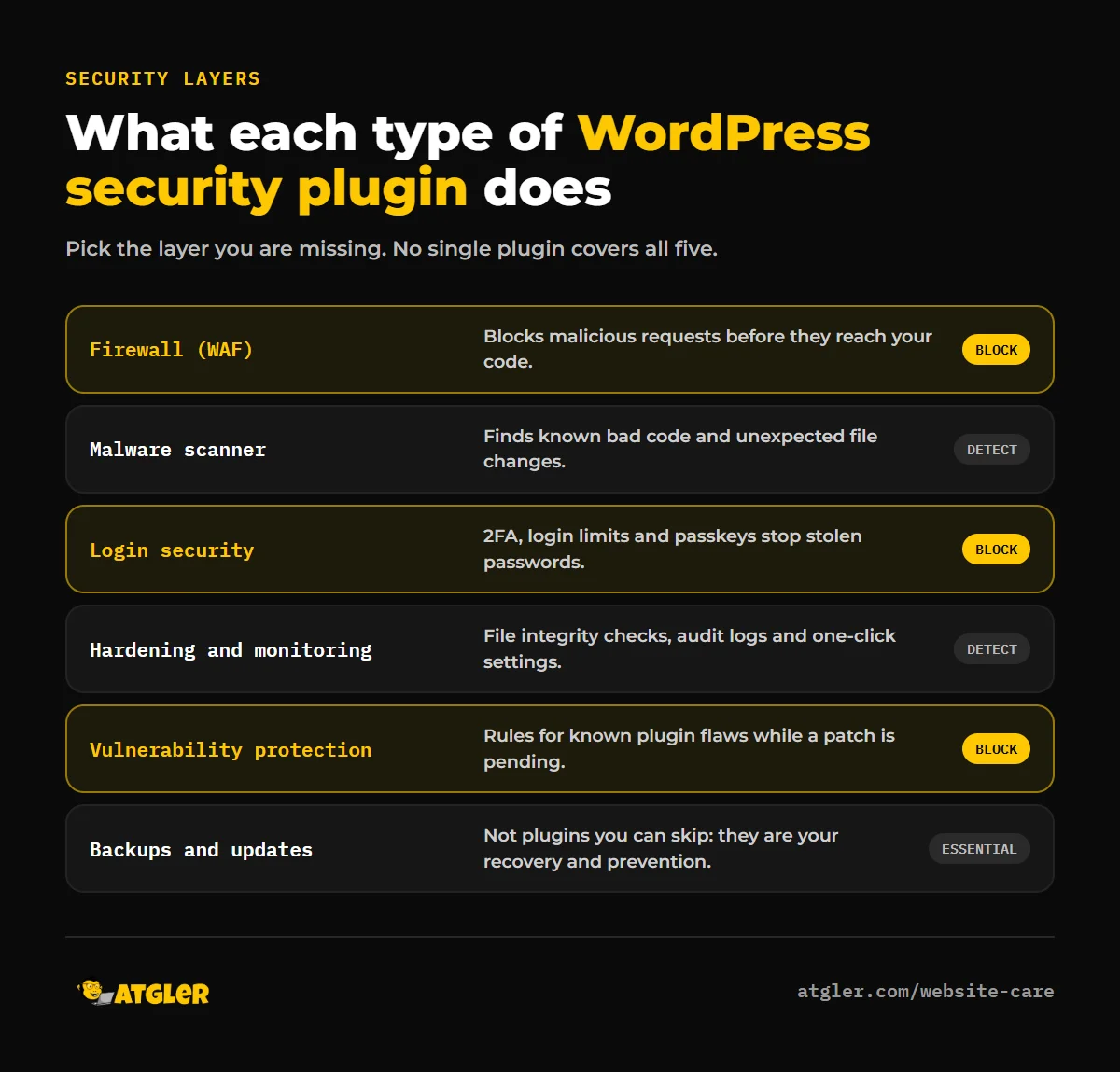
- Firewalls (WAF): block malicious requests before they reach your code. Endpoint firewalls run inside WordPress, while cloud firewalls sit in front of your site.
- Malware scanners: check files for known malicious code and unexpected changes. See our article on how accurate WordPress malware scanner plugins really are.
- Login security: two-factor authentication, login-attempt limits and passkeys that stop stolen or guessed passwords.
- Hardening and monitoring: file integrity monitoring, security activity logs and one-click settings that close common weaknesses.
- Vulnerability protection: rules that block exploits for known plugin flaws, sometimes called virtual patching.
Best WordPress security plugins compared
Data below comes from the WordPress.org plugin directory and was checked in October 2026. “Rating” is the average out of 5 on WordPress.org.
| Plugin | Active installs | Rating | Last updated | Best known for |
|---|---|---|---|---|
| Wordfence Security | 5,000,000+ | 4.7 (5,038 reviews) | Sept 30, 2026 | Endpoint firewall and malware scanner |
| All-In-One Security (AIOS) | 1,000,000+ | 4.7 (1,719 reviews) | Oct 26, 2026 | Broad free toolkit from the UpdraftPlus team |
| Kadence Security | 700,000+ | 4.6 (3,992 reviews) | Oct 14, 2026 | Login security, brute-force protection, hardening |
| Sucuri Security | 600,000+ | 4.2 (386 reviews) | Oct 14, 2026 | Auditing, file integrity, remote scanning |
| MalCare | 100,000+ | 4.4 (558 reviews) | Sept 17, 2026 | Scanning and cleanup |
| Patchstack | 100,000+ | 4.9 (61 reviews) | July 28, 2026 | Vulnerability protection (not a malware scanner) |
| Defender | 80,000+ | 4.8 (334 reviews) | Sept 29, 2026 | Easy setup, scans, 2FA and hardening |
All of these list compatibility with WordPress 7.1.4 except Patchstack, which lists 7.0.8. Install counts and ratings tell you about popularity and user satisfaction, not about how well a plugin catches attacks.
Wordfence: best all-round choice among WordPress security plugins
With over 5 million active installs, Wordfence is the most widely used option. It combines an endpoint web application firewall, a malware scanner, login security (including 2FA) and live traffic views in one plugin. Because the firewall runs inside WordPress rather than in front of it, it can see decrypted requests and doesn’t need DNS changes.
Important detail: according to its official plugin description, the free version receives new firewall rules and malware signatures 30 days after Premium users. That delay matters, because the Patchstack data above shows that exploitation of serious vulnerabilities often starts within hours. If your site handles sensitive data or you can’t update immediately, the paid tier’s real-time updates are the main reason to upgrade.
Best for: most WordPress sites that want one capable all-in-one plugin. Watch out for: the free signature delay, and the extra server load that any scanner can add on cheap shared hosting.
Sucuri Security: the WordPress security plugin for monitoring and remote scanning
The free Sucuri Security plugin focuses on visibility: a security activity audit log, file integrity monitoring, remote malware scanning and blocklist monitoring that alerts you if your site lands on one. It isn’t the full firewall. Sucuri’s firewall and cleanup services are part of its paid Website Security Platform, which its pricing page lists at $229, $339 and $549 per year per site, with manual malware cleanups included on every plan.
Best for: site owners who want alerts and a path to professional cleanup if something goes wrong. Watch out for: the plugin alone doesn’t block attacks, and its WordPress.org rating (4.2) is lower than the others in this list.
Kadence Security: the WordPress security plugin for login protection
Kadence Security is the plugin formerly sold as iThemes Security and Solid Security. It specializes in protecting the login, which is where many attacks begin: brute-force lockouts backed by a network of nearly a million sites, two-factor authentication, passwords and one-click hardening. Its Pro version adds Patchstack integration for vulnerability protection.
Best for: membership sites, stores and multi-author blogs where many people log in. Watch out for: the name change. Older tutorials refer to it as iThemes or Solid Security.
Defender: the beginner-friendly WordPress security plugin
The Defender plugin from WPMU DEV is designed to be simple: on-demand malware scans, a firewall, login limits, two-factor authentication, one-click hardening and clear reports that show what needs attention. It has the smallest install base in this list (80,000+) but a high rating of 4.8.
Best for: non-technical site owners who want a guided setup. Watch out for: smaller community and fewer independent tutorials than Wordfence.
All-In-One Security (AIOS): best free toolkit for login, files and spam
AIOS comes from the team behind UpdraftPlus and bundles login lockouts and 2FA, file-change notifications, file and database permission checks, firewall rules, spam prevention and an audit log. It was updated most recently of all the plugins here (October 26, 2026).
Best for: small sites that want broad coverage without a premium subscription. Watch out for: there are many settings, and aggressive options can lock you out of your own site if misconfigured.
Patchstack: protection for plugin vulnerabilities, not a malware scanner
Patchstack takes a different approach: it focuses on vulnerabilities in plugins and themes and deploys mitigation rules for them. Its pricing page is clear that it does not scan your files like a malware scanner. That’s a strength if you want targeted protection while a vendor patch is pending, but it means you still need something else for scanning and cleanup. The Developer plan is listed at $69 per month, or $828 per year, and includes three seats.
Best for: agencies and developers managing multiple sites. Watch out for: it complements a scanner and firewall rather than replacing them.
MalCare: scanning and cleanup, with vendor-reported numbers
MalCare positions itself around malware scanning and cleanup. It has published its own comparison in which it reports a higher detection rate than competitors, but the page itself labels the result as its own test and not an independent benchmark. Treat vendor-run comparisons, including that one, as marketing until independent testing confirms them.
How to choose between WordPress security plugins
| If you… | Consider |
|---|---|
| Want one plugin that covers firewall, scanning and login security | Wordfence |
| Want a guided setup and clear reports | Defender |
| Have a store or many logins and care most about account security | Kadence Security |
| Want a free, broad toolkit without a subscription | All-In-One Security |
| Want alerts plus professional cleanup behind you | Sucuri |
| Manage many client sites and want vulnerability-specific protection | Patchstack, alongside a scanner |
As a rule, install one full security suite and add a specialist layer only if you need it. Running two firewalls or two scanners at the same time commonly causes conflicts and slows the site down.
WordPress security plugins setup checklist
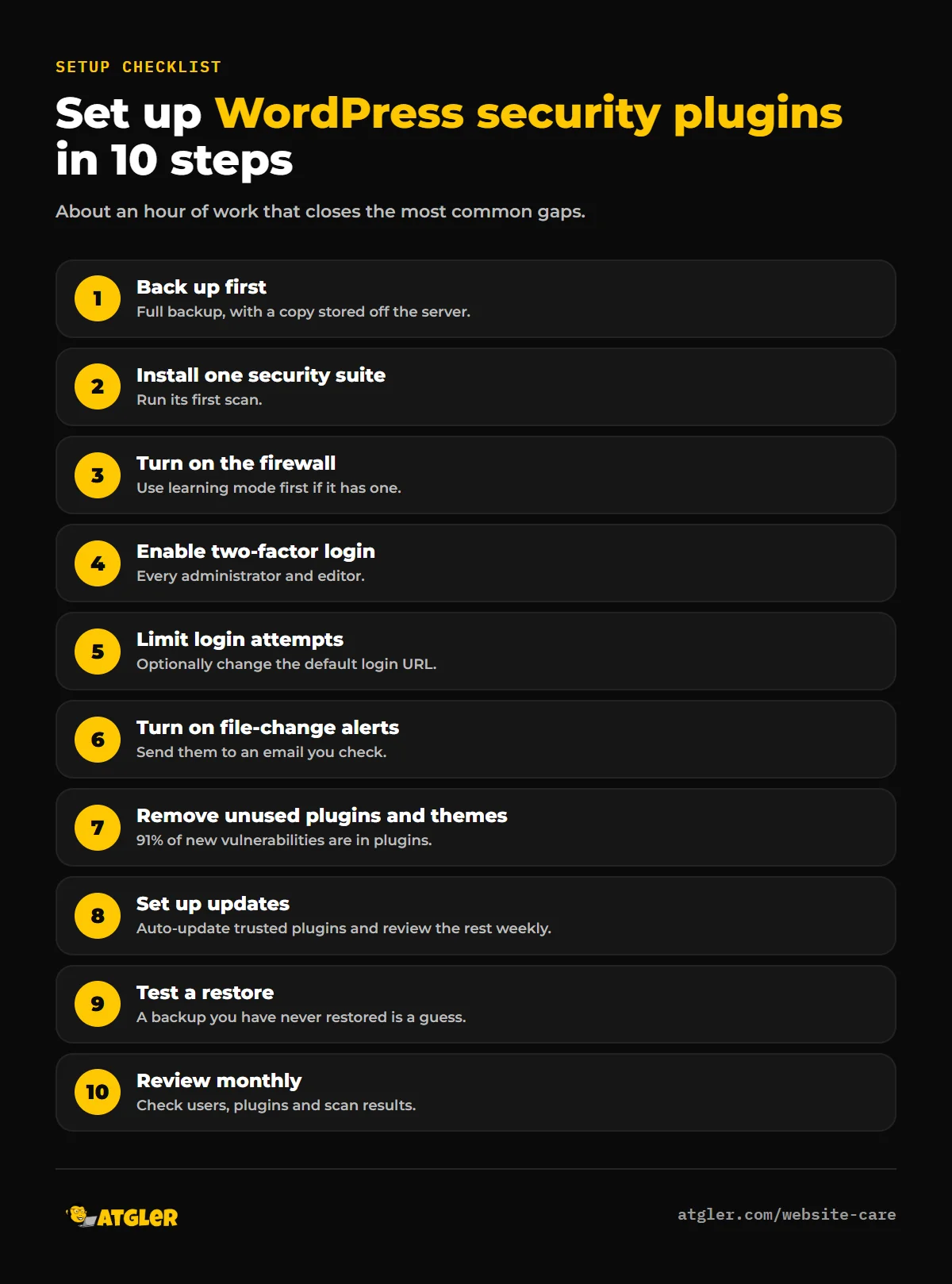
- Take a full backup first, and store a copy off-site.
- Install one security plugin and run its first scan.
- Turn on the firewall, and use learning mode if the plugin offers it before switching to full blocking.
- Enable two-factor authentication for every administrator and editor.
- Limit login attempts and consider changing the default login URL.
- Turn on file-change monitoring and email alerts.
- Remove unused plugins and themes, since 91% of vulnerabilities are in plugins.
- Turn on updates for plugins that have a good track record, and review the rest weekly.
- Confirm a restore from backup actually works.
- Schedule a monthly check of users, plugins and scan results.
When a plugin isn’t enough
If you see redirects, unknown admin users, spam pages or a Google warning, you’re past prevention. A plugin may flag part of it, but the usual cause of reinfection is a missed backdoor. Our guide to finding and removing a WordPress backdoor explains how to check, and our hacked site repair service handles the cleanup for $149 to $249. To stop it happening again without managing plugins yourself, our WordPress care plans cover updates, backups and monitoring. For what a cleanup costs, see how much WordPress malware removal costs.
Frequently asked questions
What is the best security plugin for WordPress?
For most sites, Wordfence is the best all-round choice because it combines a firewall, malware scanner and login security in one plugin. Kadence Security is stronger for login-focused protection, Defender is easiest for beginners, and Sucuri is a good fit if you want alerts and professional cleanup behind you.
Is a free WordPress security plugin enough?
For many small sites, yes, as long as you also keep everything updated and keep off-site backups. The main limitation to know about is that Wordfence’s free version gets new firewall rules and malware signatures 30 days after Premium users.
Can I use two security plugins at once?
It’s generally better not to run two full security suites together. Overlapping firewalls and scanners can conflict and slow your site. Use one main plugin and add a specialist layer, such as vulnerability protection, only if you have a clear reason.
Do security plugins slow down WordPress?
They can, especially scanners on shared hosting. Schedule scans for quiet hours, and choose settings that fit your hosting plan. A well-configured plugin usually has a small effect on visitors.
Can a security plugin remove malware?
Some can remove known malware automatically, and paid tiers sometimes include cleanup. But plugins often miss custom or obfuscated backdoors, so a thorough cleanup also needs manual checks. A clean scan doesn’t prove the site is clean.
Do I still need backups if I have a security plugin?
Yes. A plugin reduces the chance of a hack, but backups are what let you recover if something gets through. Keep at least one copy off the server and test restoring it.
Sources
- WordPress.org plugin directory: Wordfence, Sucuri Security, Kadence Security, Defender, All-In-One Security, MalCare, Patchstack (install counts, ratings and update dates checked October 2026)
- Patchstack: State of WordPress Security in 2026 and pricing
- Sucuri: Website Security Platform pricing
- MalCare Research: vendor-run scanner comparison (July 2026; labeled by the vendor as not an independent benchmark)