
On this page
- The short answer: what a WordPress malware scanner can and can’t do
- What does a WordPress malware scanner actually check?
- Where a WordPress malware scanner falls short
- A real case: when the scanner found only part of it
- What published WordPress malware scanner “tests” really show
- How to use a WordPress malware scanner properly
- How to judge any WordPress malware scanner claim
- If your WordPress malware scanner finds something
- Frequently asked questions
No, a WordPress malware scanner doesn’t catch everything, and nobody should tell you it does. Scanners are good at finding known malware and files that have been changed, which makes them worth running. They’re much weaker against new or heavily disguised code, and many of the ways attackers stay on a site, such as hidden admin accounts or scheduled tasks, aren’t files at all.
This article looks at what the evidence actually shows. We also looked for independent, published tests that compare WordPress scanner plugins on the same set of infections, and as of October 2026 we couldn’t find a rigorous one. That gap matters, and we explain what it means for how you should use a scanner. If your site is already acting strangely, start with our hacked WordPress site recovery guide.
The short answer: what a WordPress malware scanner can and can’t do
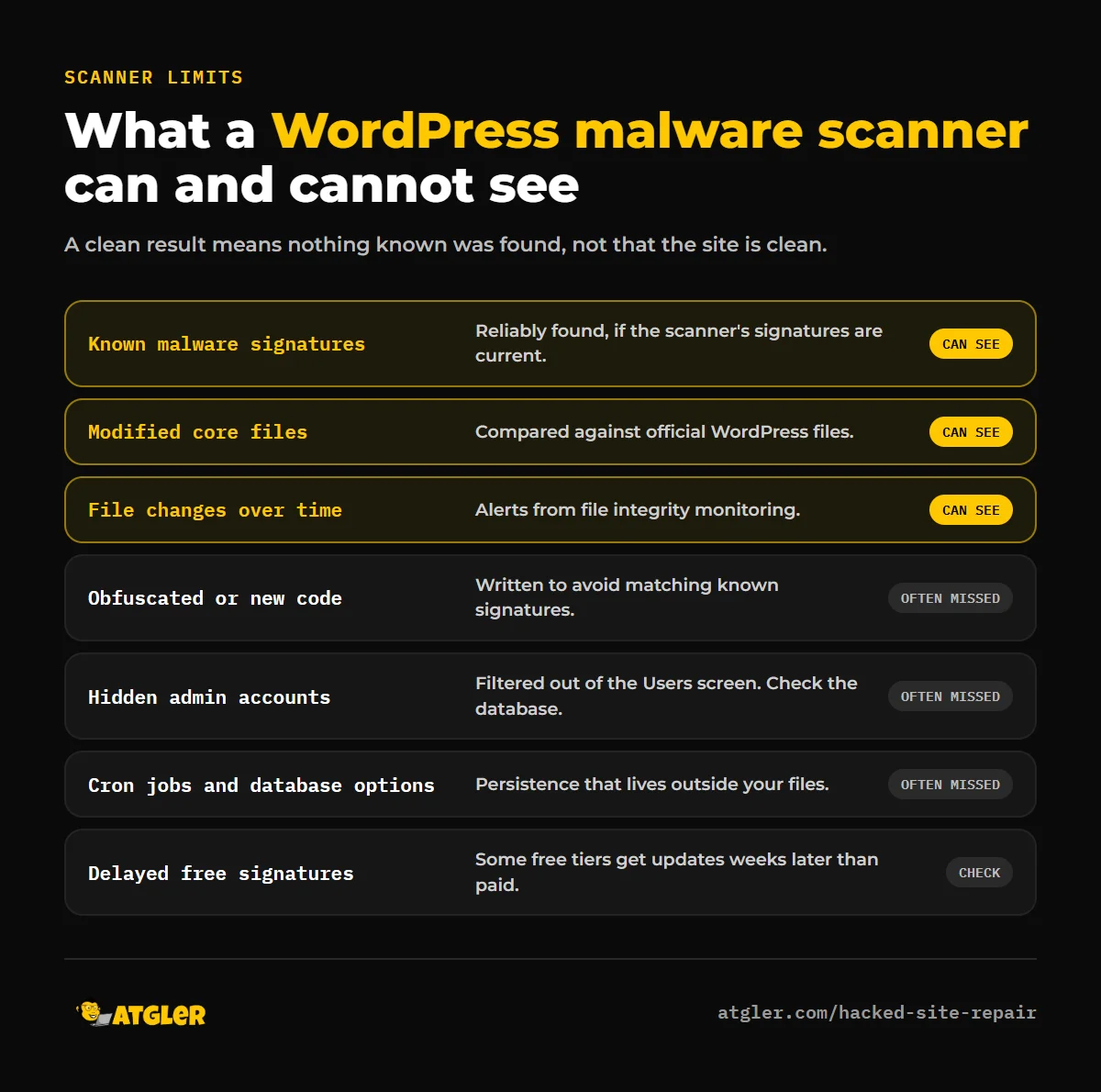
- It can: flag known malware signatures, spot files that differ from the official WordPress files, alert you to file changes and warn you if your site is on a blocklist.
- It can’t reliably: catch code written to avoid detection, find an attacker’s access that lives outside the file system, or prove your site is clean. A “no threats found” result means nothing known was found.
What does a WordPress malware scanner actually check?
Scanners differ, but most combine a few techniques:
- Signature matching: comparing your files against a database of known malicious code. Wordfence’s plugin description says its firewall rules and malware signatures come from a threat-defense feed maintained by its research team.
- File integrity checks: comparing files with known-good copies, or alerting when files change. Sucuri’s plugin, for example, lists file integrity monitoring and a security activity audit log.
- Remote scanning: looking at your site from the outside, the way a visitor or search engine does. Sucuri’s plugin includes remote malware scanning and blocklist monitoring.
The official WordPress.org guide on hacked sites notes that application-level scanners (plugins) and remote scanners are designed to look for different things, and that no single solution is best, but together they improve your odds. That’s a useful rule of thumb. To compare the main options, see our guide to the best WordPress security plugins.
Where a WordPress malware scanner falls short
1. Obfuscated and brand-new code
Signature matching only finds what’s already known. The authors of a December 2024 arXiv paper on webshell detection describe encoding, encryption and polymorphism as ways webshells slip past signature-based detection, and say that matching scripts against collections of known malicious code has a low detection rate for obfuscated ones. We couldn’t load the full paper to check the details, so treat that as the authors’ framing rather than a measured result for WordPress plugins. The practical point holds either way: attackers change their code specifically so it won’t match.
2. Delayed signature updates on free plans
Speed matters because Patchstack’s 2026 security report found the median time to mass exploitation of heavily exploited vulnerabilities was about 5 hours. Wordfence’s official plugin description states that the free version receives new firewall rules and malware signatures 30 days after Premium. A scanner that learns about a threat a month later is working with old information against a fast-moving threat. Other vendors have their own free and paid differences, so check what yours does.
3. Access that isn’t a file
Many backdoors aren’t files you can scan. In October 2026, Patchstack described a campaign that creates an administrator account hidden from the Users screen by filters in a must-use plugin, plus a magic login link and a file manager. Finding the hidden user means querying the database and comparing it with what wp-admin shows. Malicious cron events and database options are the same. Our guide to finding and removing a WordPress backdoor walks through those checks.
4. Remote scanners only see what’s public
An outside scanner can only report what your site shows it. Malware that targets only certain visitors, such as mobile users or people arriving from Google, can look clean from a scanner’s point of view. That’s one reason the WordPress.org guide recommends using both kinds of scanner.
A real case: when the scanner found only part of it
A 2026 thread on the WordPress.org support forums shows how this plays out. The site owner reported reinfection after a cleanup: malware reappeared in plugin, must-use and theme folders, in the database, and in scheduled tasks, and a hidden administrator account was recreated. They had rotated every password and salt, verified core files against the originals, and run Wordfence scans, but the scans flagged only the files that couldn’t be deleted. The other persistence, including the cron events and the account, had to be tracked down by hand. In the end, the host’s “Fix Permissions” tool removed an immutable flag on the files, and the owner rebuilt the site from fresh core and a pre-infection backup. It’s one anecdote, not a benchmark, but it matches what security researchers say about layered persistence.
What published WordPress malware scanner “tests” really show
Most comparisons you’ll find online come from security vendors. A good example is a July 2026 comparison from MalCare, which says it replayed 50 recent real-world infections against each scanner and reports its own scanner at 91%, Wordfence at 61% and Sucuri SiteCheck at roughly 37%. The page itself carries the disclaimer “Our test, not an independent benchmark,” and says the figures aren’t a guarantee for every site.
There are three reasons to treat results like these carefully:
- Conflict of interest. The company running the test sells one of the products being compared, and chooses the samples.
- Different tools. Sucuri SiteCheck is a remote scanner, while Wordfence is a plugin that scans files on your server. They look at different things, which makes a single percentage hard to compare fairly.
- Unpublished samples. Without the infection samples and method, nobody else can reproduce the result.
That doesn’t mean the numbers are wrong. It means they’re a claim, not proof. The same caution applies to every vendor, including the ones we mention in other guides.
How to use a WordPress malware scanner properly
Since no scanner is complete, use it as one layer in a routine:
- Run one server-side scanner and one remote scanner. Together they cover more than either alone.
- Verify checksums. If you have WP-CLI,
wp core verify-checksumscompares your core files with the official ones, andwp plugin verify-checksums --alldoes the same for plugins from WordPress.org. - Check what scanners don’t: administrator accounts in the database, the
mu-pluginsfolder, PHP files in uploads, cron events and server configuration files. - Turn on file-change alerts so you hear about changes between scans.
- Keep everything updated. A scanner tells you about problems after the fact. Updates prevent many of them.
- Treat “clean” as provisional. After a hack, monitor for one to two weeks before trusting a clean result.
How to judge any WordPress malware scanner claim
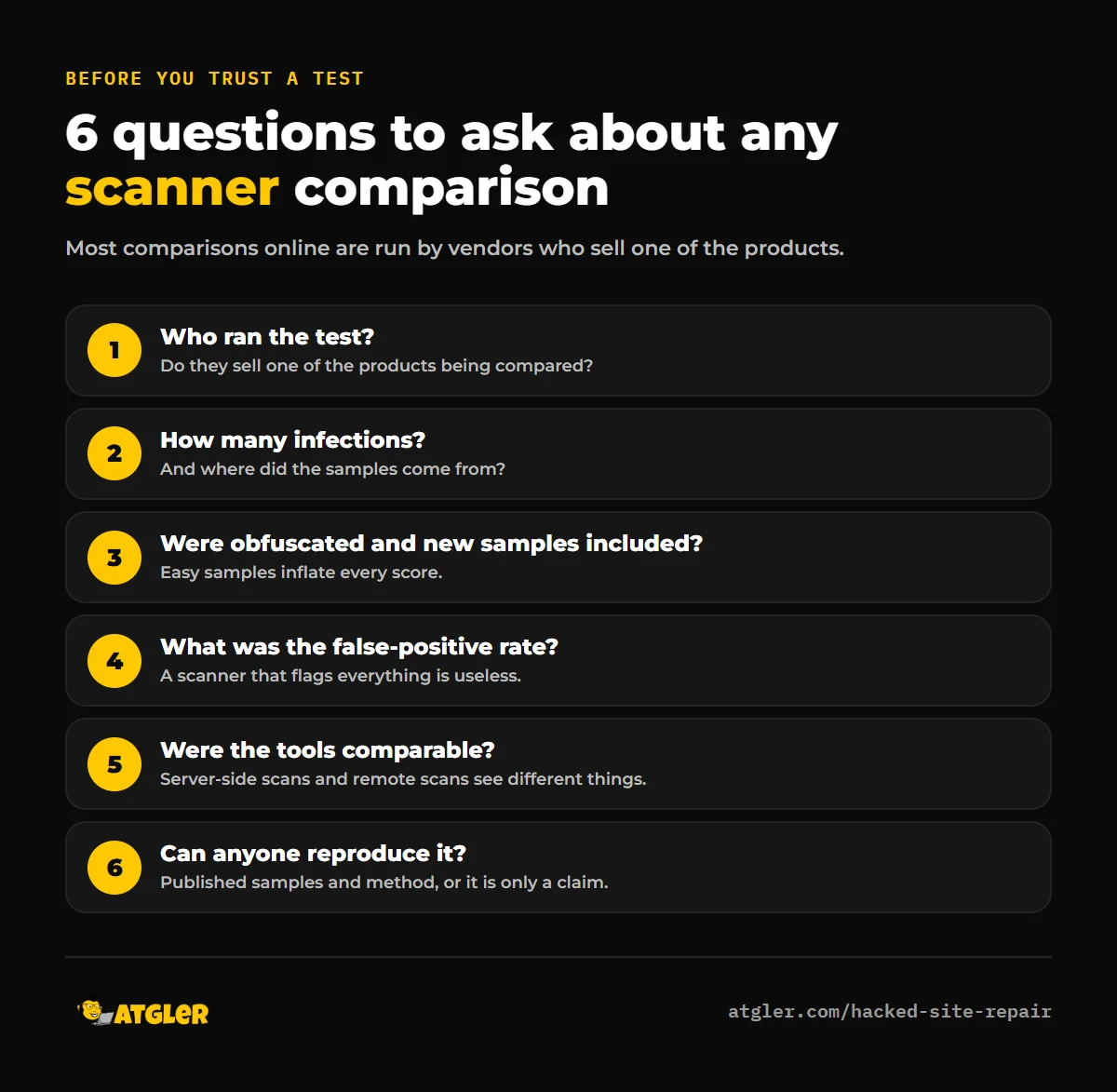
When a site says its scanner has a high detection rate, ask:
- Who ran the test, and do they sell one of the products?
- How many infections were tested, and where did they come from?
- Were obfuscated and brand-new samples included?
- What was the false-positive rate? A scanner that flags everything is useless.
- Were the tools doing the same job (server-side file scan versus remote scan)?
- Can anyone else reproduce the test?
If your WordPress malware scanner finds something
Don’t just delete the flagged file. That usually removes the visible symptom and leaves the way in. Back up the infected site first, find out how the file got there, reset every password and salt, and follow the full steps in our recovery guide. If you’d rather hand it off, our hacked site repair service covers files, database, hidden users and the entry point for $149 (48 hours) or $249 (24 hours), with a 30-day re-hack guarantee. For typical prices elsewhere, see how much WordPress malware removal costs.
Frequently asked questions
Do WordPress malware scanners catch all malware?
No. They find known signatures and file changes well, but can miss obfuscated or new code and access methods that aren’t files, such as hidden admin accounts or cron jobs.
Is a free WordPress malware scanner good enough?
For routine checks on a low-risk site, often yes, as long as you also keep backups and updates in place. Be aware that some free versions get new signatures later than paid ones. Wordfence’s free version, for example, is delayed by 30 days according to its plugin description.
Which WordPress malware scanner is the most accurate?
We couldn’t find an independent, reproducible benchmark that answers that. The comparisons available are mostly run by vendors, and the one we checked labels itself as not independent. Choose based on features, update frequency and support, and combine a server-side scanner with a remote one.
Can a scanner find a hidden admin user?
Not always. Some hidden accounts are filtered out of the Users screen by code, so you need to check the database directly. Our backdoor guide includes a query for that.
Why does malware come back after a scan says my site is clean?
Usually because a backdoor was missed, such as a must-use plugin, a hidden user, a scheduled task or code stored in the database. It can also come back if the original vulnerable plugin is still installed.
How often should I scan my WordPress site?
A scheduled scan at least weekly, plus file-change alerts running continuously, is a reasonable baseline. Scan again after any plugin or theme change, and more often if your site handles customer data.
Sources
- WordPress.org: FAQ: My site was hacked and the plugin pages for Wordfence and Sucuri Security
- Patchstack: State of WordPress Security in 2026 and Four ways back in (October 2026)
- arXiv: Enhancing Webshell Detection With Deep Learning-Powered Methods (December 2024; abstract-level claims only)
- MalCare Research: vendor-run scanner comparison (July 2026; labeled by the vendor as not independent)
- WordPress.org support forums: Reinfection after cleanup
- WP-CLI: wp core verify-checksums