

On this page
- Key takeaways
- Start with how the redirect behaves
- Why does a WordPress spam redirect hide from you?
- Layer 1: The database
- Layer 2: The .htaccess file
- Layer 3: Theme and plugin files
- Layer 4: Injected JavaScript
- Layer 5: CDN or DNS
- Quick reference: finding a WordPress spam redirect by layer
- What the evidence does not tell you
- Getting help with a WordPress spam redirect
- Frequently asked questions
A WordPress spam redirect is almost always malicious code that sends some of your visitors to another site, and it lives in one of five places: the database, the .htaccess file, theme or plugin files, injected JavaScript, or a CDN or DNS layer. The fastest way to find it is to check each layer in turn instead of guessing.
If you would rather have someone else track it down, our hacked site repair service does exactly this. If you want to try it yourself first, start below.
Key takeaways
- A WordPress spam redirect is almost always malicious code hiding in one of five places: the database, .htaccess, theme or plugin files, injected JavaScript, or a CDN or DNS layer.
- Google’s hacked content policy says malicious redirects can target some users depending on referrer, user agent or device, so the redirect may never show for you.
- Sucuri reported a January 2025 redirect in a theme’s functions.php that skips logged-in users and administrators and blocks crawlers, bots and scanners (vendor-reported, 9 sites).
- Check the siteurl and home values in wp_options, and compare .htaccess against the default block between the BEGIN WordPress and END WordPress markers.
- Test as a visitor would, in a logged-out private window, from Google results and on a phone, because one clean result is not proof that no redirect exists.
Start with how the redirect behaves
Before you open any files, note when the redirect happens. The pattern points you to a starting layer, though not a certain one.
- Everyone, every page: start with the database and .htaccess.
- Only from Google results: the code is checking the referrer. Look in theme files and JavaScript.
- Only on phones: the code is checking the device. Look in theme files and JavaScript, then the CDN.
- Only for visitors, never for you: the code skips logged-in users. See the next section.
- Happens before WordPress loads: check .htaccess, then the CDN or DNS.
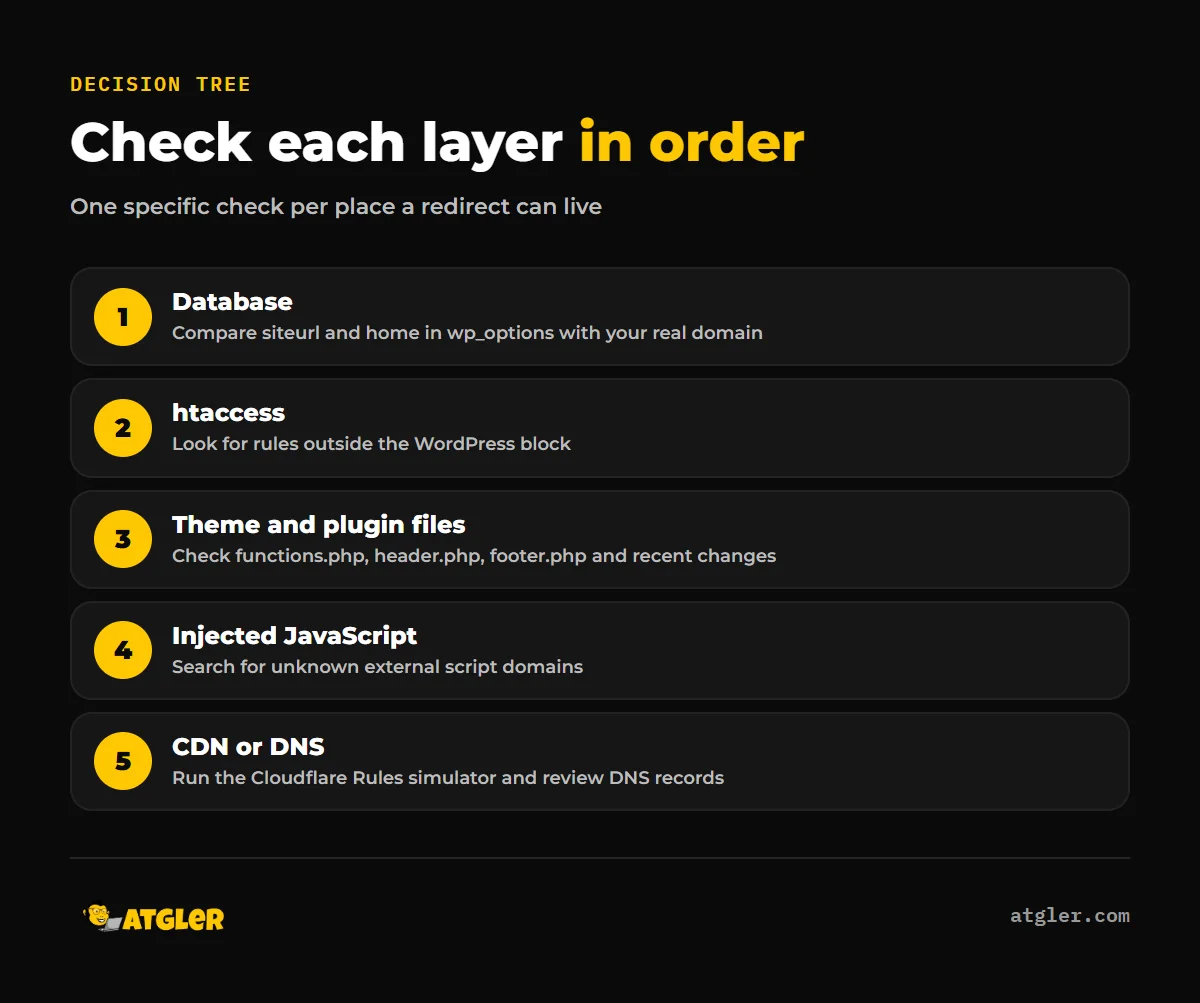
No source ranks these locations by how often they occur. Security vendors report cases in all of them, so check the layers in order and stop at the first one that shows something unfamiliar.
Why does a WordPress spam redirect hide from you?
If your WordPress site redirects to spam for customers but looks fine to you, that is by design. Google’s hacked content policy describes redirects as malicious code that redirects some users depending on referrer, user agent or device. Google’s sneaky redirect examples include showing desktop users a normal page while sending mobile users to a different spam domain. So a WordPress redirect only on mobile is a known pattern, not a glitch.
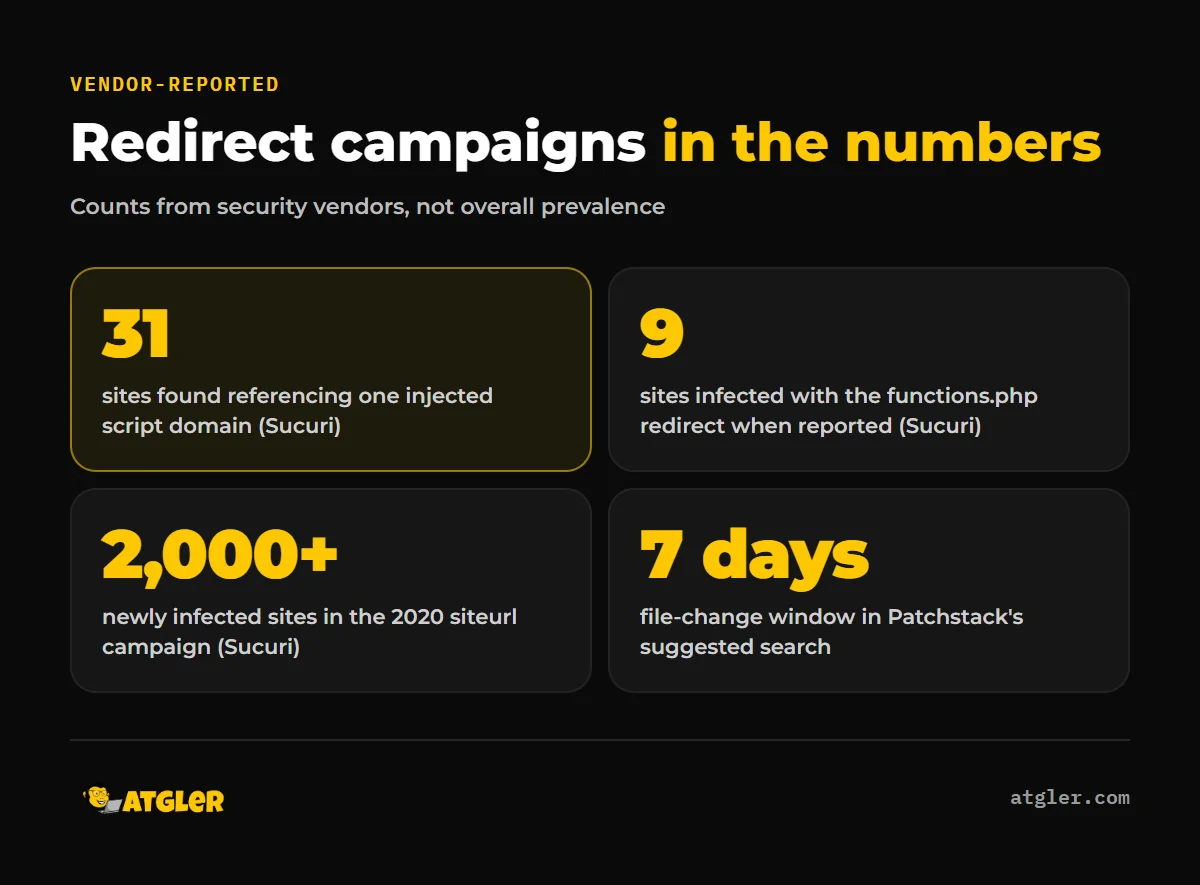
Sucuri, a security vendor, reported a redirect injected into an active theme’s functions.php in January 2025. According to Sucuri, it skips logged-in users and administrators, sets a cookie named MkQQ, and uses regular expressions to block search-engine crawlers, bots and scanners. It also skips URLs containing /wp-login.php and /wp-json. Sucuri counted 9 infected sites at the time of writing. That figure is vendor-reported.
A 2020 Sucuri report described similar logic: a function called checkone() looked for a _logged_in cookie and a /wp-admin request before redirecting. A WordPress.org support thread titled “Website Redirected From Google Search” shows the confusion this causes. The site owner saw a spam redirect from Google results, got a generic pointer to the cleanup guide, and the thread closed unresolved.
So test the way a visitor would:
- Open a private window while logged out.
- Search for your site on Google and click through from the results.
- Repeat on a phone, ideally on mobile data rather than your office Wi-Fi.
Do not trust a clean result from a single test. Absence of a redirect for you is not proof that none exists.
Layer 1: The database
WordPress stores your site address in the wp_options table as the siteurl and home options. If a WordPress redirecting to random sites problem hits every page, this is the quickest check. Open the table in phpMyAdmin or your host’s database tool and confirm both values match your real domain.
Sucuri called changed home and siteurl values in wp_options “likely one of the first red flags of malicious behavior” in a 2020 report. It said it had seen over 2,000 newly infected sites since it began tracking that campaign (vendor-reported). Treat it as an illustration of the check, not as a measure of how common it is today.
WordPress documentation says you can hard-code both values in wp-config.php with define(‘WP_HOME’, …) and define(‘WP_SITEURL’, …). That locks the fields in General settings, so a hijacked database value is overridden. It also gives you a second value to compare against.
Patchstack’s redirect guide, a vendor source, also suggests two more database checks:
- Review the active_plugins option for plugins you do not recognize.
- Check option_value fields such as widgets, theme_mods and custom_css for encoded content or JavaScript.
Layer 2: The .htaccess file
WordPress edits .htaccess to handle pretty permalinks. According to WordPress developer documentation, the default block sits between “# BEGIN WordPress” and “# END WordPress”. Its key lines are RewriteCond %{REQUEST_FILENAME} !-f and RewriteRule . /index.php [L], which send any request that does not match a real file or directory to index.php.
Anything else is not part of the default. Open the file in your host’s file manager and look for:
- RewriteRule or Redirect lines above or below the WordPress block.
- RewriteCond lines that mention a referrer, user agent or mobile device.
- Rules pointing to a domain you do not own.
Patchstack advises removing unfamiliar redirect rules and rewrite conditions. The WordPress documentation notes that the default block can help you restore a corrupted .htaccess. Save a copy of the file before you change it, so you can see what was there.
Layer 3: Theme and plugin files
Many redirects sit in PHP files that load on every request. Patchstack lists wp-config.php, index.php, functions.php, header.php and footer.php as the places to check for encoded strings and for eval() or base64_decode(). Sucuri’s 2025 case sat in the active theme’s functions.php, and its 2020 case added a location.replace script to the theme’s index.php.
To find recently changed files, Patchstack suggests this command, which lists files modified in the past week:
find /path/to/wordpress -type f -mtime -7 -ls
Replace the path with your install folder. If you have no shell access, sort files by modified date in your host’s file manager. A theme file changed on a day you did not touch it deserves a close look. Compare suspect files with a fresh copy of the same theme or plugin version.
Cleaning one file is rarely enough if an attacker left a way back in. Our guide on how to find and remove a WordPress backdoor covers that part.
Layer 4: Injected JavaScript
Not every redirect needs PHP. In March 2025, Sucuri described JavaScript appended to the bottom of a theme file, ./wp-content/themes/astor/public/js/site.js. According to Sucuri, it loads an external script from awards2today[.]top/jsjs, which creates a hidden link and auto-clicks it to force the redirect. Using PublicWWW, the author found at least 31 sites referencing that domain. That count is vendor-reported.
Sucuri’s recommended checks fit a simple routine:
- Look for recently modified JavaScript files in themes and plugins.
- Search your files for any suspicious domain you find.
- Review every external script your pages load.
- Check for hidden PHP backdoors that could re-add the code.
Patchstack adds that inline or minified scripts and script references to unknown external domains are worth scrutiny. In your browser, view the page source and search for “script src”. Any domain you cannot explain needs a reason to be there.
Do not rely on a plugin scan alone. A single community write-up reported a Wordfence scan missing a JavaScript redirect, but one anecdote says nothing about detection rates. Our article on what malware scanner plugins catch and miss looks at the broader evidence.
Layer 5: CDN or DNS
If you have searched WordPress thoroughly and found nothing, the redirect may not be coming from WordPress at all. A CDN such as Cloudflare can redirect requests with its own rules. Cloudflare’s documentation says to use the Rules simulator to determine whether a redirect rule is triggering for a specific URL. If the redirect appears there, it is set in Cloudflare, not sent by your origin server.
For DNS, we found no vendor or Google source covering redirects caused by altered registrar or DNS records, so we will not pretend there is a tested checklist. The general logic is straightforward: compare your DNS records and any forwarding settings at your registrar with what you set up, and check who has access to those accounts. Treat that as a reasonable step, not an established procedure.
Quick reference: finding a WordPress spam redirect by layer
| Layer | Specific check | Warning sign |
|---|---|---|
| Database | siteurl and home in wp_options; active_plugins; widgets, theme_mods, custom_css | A domain that is not yours, or encoded content |
| .htaccess | Compare with the default WordPress block | Rules outside the BEGIN/END WordPress markers |
| Theme and plugin files | functions.php, header.php, footer.php, index.php, wp-config.php; files changed in the last 7 days | eval(), base64_decode(), unexpected edits |
| Injected JavaScript | Recently modified JS files; every external script domain | Unknown script sources, hidden auto-clicked links |
| CDN or DNS | Cloudflare Rules simulator; registrar and DNS records | A rule or record you did not create |
What the evidence does not tell you
The public evidence has real limits, and you should know them before relying on any checklist.
- No study with a stated method measures how often redirects live in each layer. Every count above comes from a vendor’s own scans or searches, and vendors sell scanners and cleanup services.
- Vendors do not agree on the most common location. Sucuri’s recent cases were in theme files, its 2020 case involved the database, and other guides put .htaccess first.
- Google’s documentation shows no last-updated date on the pages we read, so we cannot say how recent the wording is.
- We found no sourced guidance on DNS-level redirect hijacking, and we could confirm only the Rules simulator on Cloudflare’s page.
That is why this tree checks every layer instead of ranking them. It is also worth separating a legitimate redirect from a sneaky one. Google lists moving a site, consolidating pages and sending logged-in users to an internal page as legitimate. The test is whether the redirect is meant to deceive.
Getting help with a WordPress spam redirect
If you have worked through all five layers and the redirect is still there, or it keeps coming back after cleanup, a hidden backdoor or a missed file is the likely reason. Our hacked site repair is a flat fee: $149 Standard (48 hr) or $249 Priority (24 hr), with a 30-day re-hack guarantee. If you are still working out the first steps, our guide on what to do when your WordPress site is hacked is a good place to start.
Frequently asked questions
Why does my site redirect only when I arrive from Google?
Google’s hacked content policy describes redirect code that acts depending on referrer, user agent or device. The code checks where the visitor came from and only redirects search traffic, which makes it hard for the owner to notice.
Why can’t I see the redirect when I am logged in as admin?
Some redirect malware deliberately skips logged-in users and administrators. Sucuri reported a functions.php injection that does this and also blocks crawlers, bots and scanners.
Why does the redirect only happen on mobile?
Google gives this as an example of sneaky redirecting: desktop users see a normal page while mobile users are sent to a different spam domain. Test from a phone, logged out.
What should my .htaccess file contain by default?
WordPress documentation says the default block sits between “# BEGIN WordPress” and “# END WordPress” and sends requests that do not match an existing file or directory to index.php. Other rewrite rules or redirects outside that block are not part of the default.
I cleaned the site and the redirect came back. What did I miss?
Sucuri’s recommended checks include looking for hidden PHP backdoors, which can restore the redirect after you remove it. Also recheck the database, recently modified JavaScript files and external scripts.
Can a redirect come from outside WordPress?
Yes. A CDN such as Cloudflare can redirect requests through its own rules, and Cloudflare’s Rules simulator shows whether a redirect rule fires for a specific URL. For DNS, we found no sourced guidance, so compare your records with what you set up.
Sources
- Google Search Central: Spam policies for Google web search (no last-updated date shown)
- WordPress Developer Resources: Apache HTTPD / .htaccess (published April 25, 2023; last modified October 14, 2026)
- WordPress Developer Resources: Migrating WordPress (published March 28, 2023; last modified October 14, 2026)
- Sucuri: Cascading Redirects: Unmasking a Multi-Site JavaScript Malware Campaign (March 6, 2025, vendor-reported)
- Sucuri: Malware Redirects WordPress Traffic to Harmful Sites (January 23, 2025, vendor-reported)
- Sucuri: Malicious JavaScript Used in WP Site/Home URL Redirects (January 21, 2020, vendor-reported)
- Patchstack: WordPress Redirect Hack (December 24, 2024, vendor-reported)
- Cloudflare Docs: Single Redirects (last updated October 30, 2026)
- WordPress.org Support Forums: Website Redirected From Google Search (page last modified April 19, 2020, anecdotal)