
On this page
- How do you fix crawled currently not indexed?
- What does “crawled currently not indexed” mean, and can you ignore it?
- What is the difference between crawled and discovered currently not indexed?
- Why is Google not indexing my pages? The causes people report
- Is crawl budget the problem on a small site?
- What order should you fix it in?
- What the evidence does not tell you
- When should you get help with crawled currently not indexed?
- Frequently asked questions
Crawled currently not indexed is a Google Search Console status meaning Google fetched the page but chose not to add it to its index. Google says this is common and does not always need action. For pages that matter, Google’s John Mueller says it usually points to quality doubts, so rule out technical errors first, then improve the page.
This article covers what Google’s documentation says, the causes people report, and an order of fixes that saves time. It also covers what nobody outside Google can tell you. If you would rather have someone work through it with you, our SEO services include Search Console diagnosis.
How do you fix crawled currently not indexed?
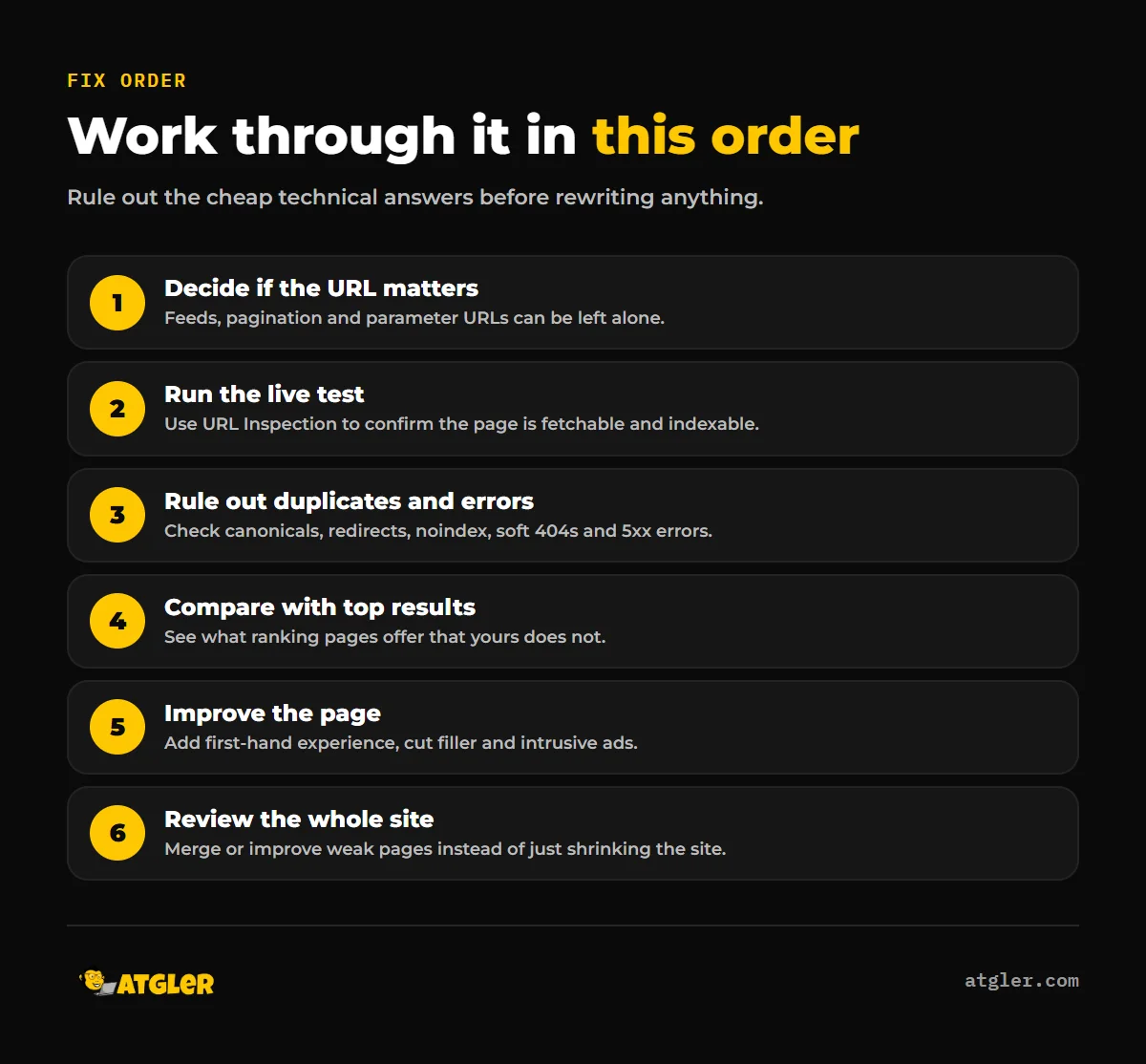
Start with the cheapest checks and move toward the expensive ones. Most cases follow this path:
- Decide whether the URL is one you actually want indexed.
- Run the URL Inspection live test and confirm the page can be indexed.
- Rule out duplicate, redirect, noindex, soft 404 and server error statuses.
- Compare the page with the pages Google already ranks, then improve it with original, first-hand content.
- If many pages are affected, review the quality of the whole site.
The sections below explain each step and where the evidence is thin.
What does “crawled currently not indexed” mean, and can you ignore it?
According to the Google Search Console Help page on the Page indexing report, the status means “The page was crawled by Google but not indexed.” Google adds that it “doesn’t index all pages across the web, so this is a common message for many sites” and that it “doesn’t necessarily indicate an issue that needs attention.”
So the answer depends on the URL. For pages you care about, Google says to check them with the URL Inspection tool and look for site problems that block indexing. Google does not list causes on that page.
Google also offers no guarantees in general. Its Search Essentials says following requirements and best practices “doesn’t mean that Google will crawl, index, or serve its content.” A clean page can still be left out.
Marie Haynes, a consultant writing in Search Engine Journal in July 2026, notes that feeds, pagination and non-canonical parameter URLs can show up in this status without being a problem. If your list is mostly those, you can probably leave it alone.
What is the difference between crawled and discovered currently not indexed?
The difference is whether Google fetched the page. With “Crawled”, Google fetched it and left it out. With “Discovered – currently not indexed”, Google knows the URL exists but has not fetched it yet.
| Status | What Google says | Page fetched? | First place to look |
|---|---|---|---|
| Crawled – currently not indexed | The page was crawled but not indexed | Yes | Page quality, duplication, indexability |
| Discovered – currently not indexed | The page was found but not crawled yet; Google postponed the crawl, possibly to avoid overloading the site | No | Server load, site size, internal links |
Google’s documentation links crawl budget to the Discovered status, not the Crawled one. That matters because the fixes differ. A Discovered URL has not yet been judged on content, while a Crawled one has.
Why is Google not indexing my pages? The causes people report
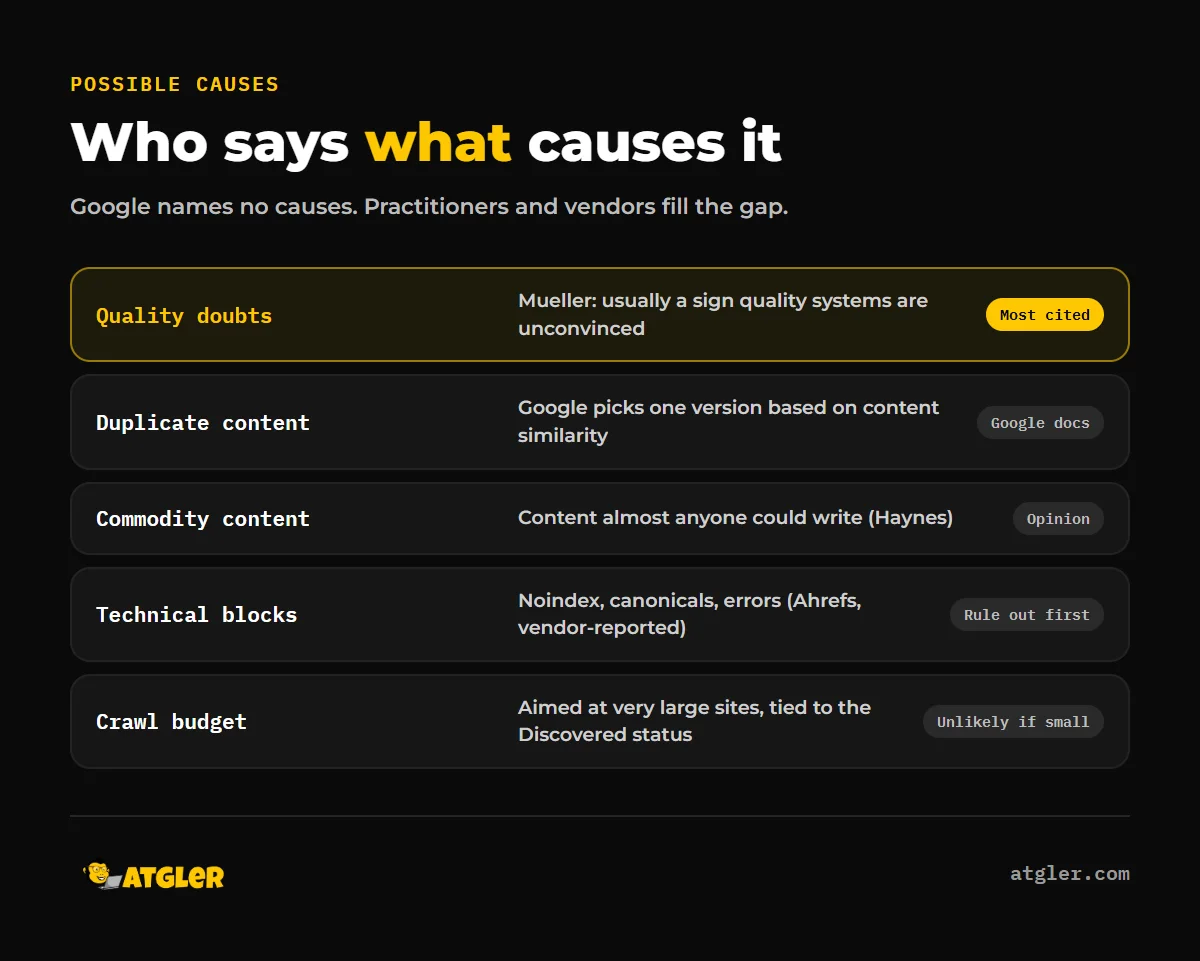
Google publishes no list of causes, so every cause below comes from Google staff comments, consultants or software vendors rather than from documentation.
The most direct statement is from Mueller. Search Engine Roundtable reported on November 11, 2026 that he replied on Bluesky: “Usually this is a sign that Google’s quality systems are unconvinced about your site.” This is a news report of a social post, not published Google guidance.
Haynes agrees that quality is the most likely cause and says technical issues are rare. She cites a Google presenter at an April 2026 event saying crawled pages may be indexed “If we think it’s useful.” She also cites a Google podcast saying that when quality concerns are serious, Google will “reduce the number of pages that they index.” She describes “commodity content” as “content that almost anyone could write about a subject.”
Ahrefs, a vendor of SEO software, lists a wider set of possible causes:
- Thin or low-quality content, duplicate content, and lack of relevance to user intent
- Noindex tags, robots.txt blocks, canonicalization issues and 404 or 500 errors
- Crawl budget limits on large sites
- Low domain authority, slow page load, and weak architecture or internal linking
Ahrefs gives no data on how often each cause occurs, and Google does not use the term “domain authority” in the pages we reviewed. Treat these as practitioner opinion, not Google statements.
Is crawl budget the problem on a small site?
Probably not. Google defines crawl budget as “the set of URLs that Google can and wants to crawl.” Its guidance targets sites with 1 million or more unique pages that change about weekly, or 10,000 or more unique pages with daily changes, or sites with a large share of URLs in Discovered – currently not indexed. Google calls these figures “a rough estimate” and “not exact thresholds.”
That page does not name Crawled – currently not indexed as a crawl budget symptom. Mueller also reportedly said crawl budget and trust are “very distinct things.” If your site has a few hundred pages, look at quality and duplication before crawl budget.
What order should you fix it in?
Go in this order, because each step is cheaper than the next.
- Triage the list. Export the affected URLs and sort out the ones you want in search from feeds, pagination and parameter URLs.
- Run the live test. In URL Inspection, test the live URL. Google says you cannot request indexing if the live test finds the page non-indexable.
- Rule out the neighbor statuses. The same Page indexing report lists “Duplicate without user-selected canonical”, “Duplicate, Google chose different canonical than user”, “Alternate page with proper canonical tag”, “Page with redirect”, “URL marked ‘noindex'”, “Soft 404”, “Not found (404)” and “Server error (5xx).” If your page fits one of these, fix that first.
- Check robots rules and noindex. Google’s robots.txt documentation says robots.txt is “not a mechanism for keeping a web page out of Google” and points to noindex instead, so look for stray noindex tags as well as blocked paths.
- Check duplication. Google says it decides “which pages (if any) are duplicates, based on similarity of content.” Redirects are the strongest canonical signal and sitemap inclusion the weakest. Near-copies of the same page, such as location or product variants, can lose to one version.
- Compare with the pages that rank. Haynes suggests comparing yours against top-ranking pages, adding first-hand experience, and removing intrusive ads and filler.
- Review the site, not just the page. Mueller said “Just making the site smaller doesn’t significantly raise the overall quality of the site.” Deleting pages alone is not a proven fix.
Do not skip steps one and two, because they cost nothing and rule out the easy answers.
What counts as a quality fix?
Google’s guidance on helpful content defines people-first content as “content that’s created primarily for people, and not to manipulate search engine rankings.” It names main-content quality as one of the most critical page-quality factors and says raters assess effort, originality, talent or skill, and accuracy. Trust, it says, is the most important part of E-E-A-T. That page does not mention indexing status, so it describes the direction of travel, not a guaranteed route out. For a plain-English start on this, see our guide to WordPress SEO basics you can handle yourself.
Does requesting indexing fix it?
Not by itself. Google’s URL Inspection help says “Submitting a request does not guarantee that the page will appear in the Google Index.” There is also a per-property daily limit on live inspections and index requests. Use the request after you have changed the page, not as the change.
What the evidence does not tell you
Several things you may want to know are simply not public:
- Google publishes no timeframe for reconsidering a page, no threshold, and no description of how its quality systems decide against indexing. Its URL Inspection page even gives three different indexing-time estimates (“a day or so”, “a few days”, “up to a week or two”).
- No source we reviewed gives a method-backed breakdown of how often each cause occurs, or how long recovery takes after fixes.
- Haynes suspects the June 2026 spam update affected sites producing commodity content at scale, and she flags this as unconfirmed.
- Mueller’s comment, as reported, says “Usually”, not always. Google’s Help page says the status may need no action. Those framings differ, though they are not strictly contradictory: one covers normal exclusions, the other covers important pages.
- The Google pages we reviewed show no update dates, so we cannot confirm how recently each was revised.
Be wary of anyone promising a specific recovery time or a guaranteed result. If you also see pages indexed but getting no traffic, that is a different problem, covered in impressions but no clicks in Search Console, and a broader view is in why your WordPress site isn’t ranking despite doing SEO.
When should you get help with crawled currently not indexed?
Get help when important pages stay excluded after you have ruled out noindex, canonical and error statuses, or when a large share of the site is affected. At that point the question is site-wide quality, which takes judgment more than a checklist.
Atgler has worked with WordPress for 7 years and has built, managed and maintained more than 600 sites. Our SEO services start from $499 a month and include reading the Page indexing report and prioritizing fixes. For a one-off look, you can request a Search Console SEO quote or start with an AI website audit. We cannot promise indexing or rankings, because Google does not.
Frequently asked questions
Is crawled currently not indexed bad for my site?
Not necessarily. Google says the status is common and does not always need attention. It matters when the excluded URLs are pages you want to appear in search.
How long should I wait before worrying?
Google gives no firm answer. Its URL Inspection help offers estimates ranging from a day or so to a week or two, so a brand-new page may simply need time, while a page that stays excluded for weeks deserves a closer look.
Should I delete pages that stay in this status?
Not as a first move. Mueller said making a site smaller does not significantly raise its overall quality. Improve, merge or leave the page, depending on whether it deserves to be indexed.
Does AI-generated content cause this status?
Google has not said so in the documentation we reviewed. Haynes points to commodity content, meaning content almost anyone could write, as a likely factor, which can describe low-effort content however it is produced.
Why do feed, pagination and parameter URLs appear here?
Haynes says these can appear in the status without being a problem. If they are not pages you want in search results, you can generally leave them alone.
Sources
- Google Search Console Help: Page indexing report (no update date shown)
- Google Search Central: Managing crawl budget for large sites (no update date shown)
- Google Search Central: Google Search Essentials (no update date shown)
- Google Search Central: Consolidate duplicate URLs (no update date shown)
- Google Search Console Help: URL Inspection tool (no update date shown)
- Google Search Central: Creating helpful, reliable, people-first content (no update date shown)
- Google Search Central: Introduction to robots.txt (no update date shown)
- Search Engine Roundtable: Google Crawled/Discovered – Currently Not Indexed A Site Quality Issue (November 11, 2026, news report of a Mueller social post)
- Search Engine Journal: Why Your Pages Are Stuck In Crawled-Currently Not Indexed & What To Do About It (July 20, 2026, consultant opinion)
- Ahrefs: Crawled – Currently Not Indexed (updated July 16, 2024, vendor-reported)